
Innioasis Y1 Review
Finally, my thoughts on device I've been daily-carrying with me for more than a month!
An mp3 player for daily use and thinkering!
More than a month ago, I wrote about listening to full albums again, a post that gathered some interesting conversations and emails from people who shared their thoughts about it. Another thing that happened was that my post was shared to Hacker News by someone. It didn’t get any traction at all, however, a single comment was left there, recommending this little device I never heard about: the Innioasis Y1.
It was described as “A modern knock-off of a click wheel iPod, smaller, lighter, bit more plastic.”
Honestly, my interest was immediately piqued. Especially one of the thoughts shared further into the comment:
Leaving the house without a phone and listening to an album end to end is amazing and changes music consumption from Spotify background noise to actual mindful enjoyment.
It’s not as frictionless as paying for streaming but if you got the time and inclination I definitely recommend.
So, without further to do, I went ahead and bought one to try it out for myself!
On hardware
I must admit, the first thing I thought—as soon as I turned it on and fiddled with it—was regret, not because the device was that bad, I simply didn’t want to stop scrobbling my music to Listenbrainz, I just think it’s fun to have those stats out there.
In the end, common sense remained, I had my albums and files ready, so I I decided to stick to my decision, and I’m happy to say it was quite the big success!
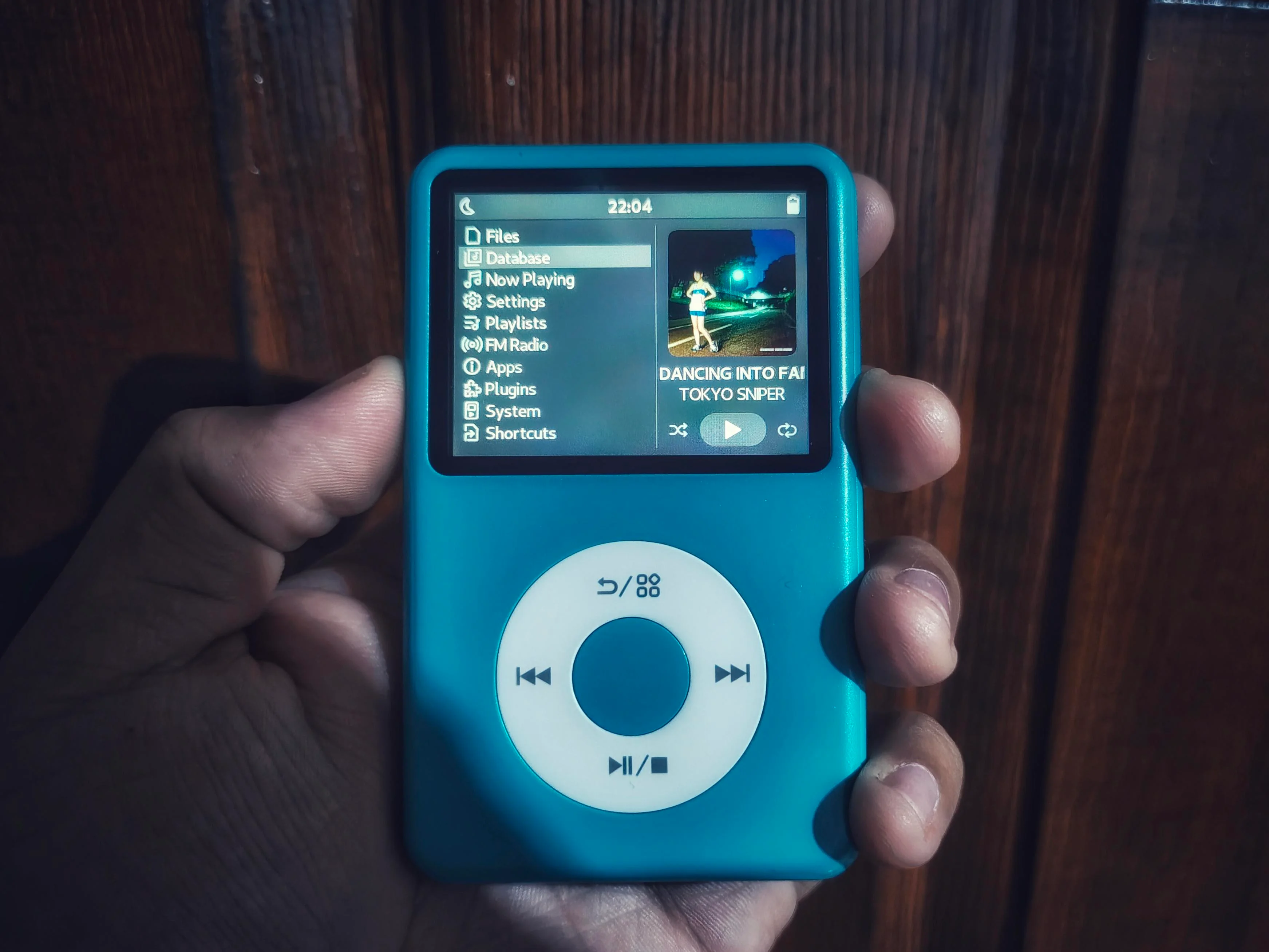
The second thing I felt was its cheapness. I own some other budget devices in other categories—such as the Miyoo Mini Plus—but that hardware has no real compromises for what it does, which is not the case for this one, where your mileage may vary depending on what you are looking for. Here are some things to note:
- The input jack is not Hi-Fi, more like what you’d find in a medium-range phone.
- The plastic body is smooth and has a good weight to it, it’s not bad at all, actually, but…
- The screen is plastic, easy to scratch, it’ll bend under pressure, it makes everything feel much cheaper.
- Bluetooth support is a nice to have, but it doesn’t sound great and there’s a lot of compression.
- There is no microSD slot, you have to pop the device open for a replacement, and the built-in card may fail.
- No visible buttons other than the wheel’s (just a tiny reset button you can press with a pin)
- I like the wheel and it works very nicely, it defintely feels cool to use, it’s probably nothing like an iPod’s though.
- Screen brightness is fine, nothing special.
- It has a mono speaker that works, nothing special but it’s rather handy!
- It has USB type C charging—use a slow charger though—and comes with a cable.
- It’s recognized as a USB device on the computer, not MTP.
Personally, the most annoying thing for me is the lack of other input options besides the wheel. You can’t change the volume without waking up the device screen, going to the playing screen, and scrolling the wheel, for example, something that a simple set of volume buttons on the side would have fixed.
Most of the other issues are nitpicky and rather easy to ignore for me, especially when you consider the price around 40 USD, I have managed to overlook pretty much everything else.
Another small issue is that some FLAC files won’t play, I think there’s a limit to the quality it can handle, but most of my FLACs have worked, I’d have to test which ones fail and why and report later.
On software
The stock firmware is functional, it does the basics, play music, display albums, radio FM support, audiobook support, etc. I must admit I didn’t use it for long, I couldn’t even figure out how to create playlists on it.
It does have a few things that aren’t very well ironed out though, for example, the songs of an album are not sorted by track number, but by filename or songname, so you will have to to rename files and add the track number at the start, not an ideal solution.
Theme support is also rather limited, you can apply skins and replace assets, but positioning things or animations are out of the question. Of course, this is plenty for most people, including me, to be honest, but I still wanted to play around some more.
That’s where Rockbox comes into play, and I’ve already wrote a bit about it, in short, it works great, and does everything I need, although it has its own set of nitpicks. Also, it is not officially supported, but the community made its own fork and got it running just fine.
The installation method can be a bit of a pain, it’s nothing that bad. I’m rather surprised at the efforts made to improve the firmware and even adding a dual boot option to switch between OSes at will.
Although there are 240p themes originally created for iPod devices, and working just fine, it’s been cool to see many community members and creators coming up with new themes that look super crisp on the Y1’s 360p screen, along themes for the original OS, with plenty of options as well.
I’m still fiddling around with the settings available, and the Rockbox build doesn’t seem to come with plugins, games and other extras that officially supported devices have, but the basics are there and it’s awesome.
Overall thoughts
For the price, despite all the caveats, this can’t be beaten. If you want something close to the iPod experience, and you don’t care for high-fidelity audio. If you don’t care for streaming apps, or any kind of online functionality, then this device is for you.
After a whole month, I must say I’ve really enjoyed my commutes to and from work listening to music on these. I have no proof, but—other than a couple nights where I played some tracks to sleep from Nintendo Music—I can promise I’ve not listened to a single song on my phone ever since I made the switch to this device.
I really, really love interacting with it, and carrying it in public feels kinda cool. Even going back to wired earphones has been a vibe I didn’t really expect to miss so much, even if I have to deal with tangled cables every once in a while.
One thing I used to do on older phones with an input jack, was carrying it and flipping it around while holding it by the cable, basically playing with it as if it was a yo-yo or some chained weapon.
Anyway, all things considered, it may not be the best thing ever, but there’s something especial about it, and thanks to the efforts of the community efforts around it, it’s super fun to use and toy with, after a few headaches with the firmware installer.
I do wish they added some sort of online connectivity at some point in a future revision, the lack of scrobbling is probably the thing I dislike the most, but if you can get over that, go ahead and give this a try!
Comments
If you have something to say, leave a comment, or contact me ✉️ instead
Reply via Fediverse
You can reply on any Fediverse (Mastodon, Pleroma, etc.) client by pasting this URL into the search field of your client:
https://fosstodon.org/@joel/115673447367414171
Are you looking for more? Here's some more great content for those who dare scroll down this section of the page. Suit yourself!


