<?xml version="1.0" encoding="utf-8"?><feed xmlns="http://www.w3.org/2005/Atom" ><generator uri="https://jekyllrb.com/" version="4.4.1">Jekyll</generator><link href="https://joelchrono.xyz/feeds/art.xml" rel="self" type="application/atom+xml" /><link href="https://joelchrono.xyz/" rel="alternate" type="text/html" /><updated>2026-07-11T12:34:20-06:00</updated><id>https://joelchrono.xyz/feeds/art.xml</id><title type="html">joelchrono’s blog</title><author><name>joelchrono</name><email>me@joelchrono.xyz</email></author><entry><title type="html">Arcticons for Miyoo Mini Plus</title><link href="https://joelchrono.xyz/blog/arcticons-for-miyoo-mini-plus/" rel="alternate" type="text/html" title="Arcticons for Miyoo Mini Plus" /><published>2024-05-17T22:48:15-06:00</published><updated>2024-05-17T22:48:15-06:00</updated><id>https://joelchrono.xyz/blog/arcticons-for-miyoo-mini-plus</id><content type="html" xml:base="https://joelchrono.xyz/blog/arcticons-for-miyoo-mini-plus/"><![CDATA[<p>I have contributed to the <a href="https://github.com/Arcticons-Team/Arcticons">Arcticons Icon Pack</a> for a while now, at this point more than 500 icons on it were designed by me. It truly has become my favorite icon pack of all time.</p>

<p>Because of this, after looking for some icons to put in my Miyoo Mini Plus, I decided to just make my own following the same style guidelines found in Arcticons.</p>

<p>Simple lines, 1 px thick and dots at 1.5px if needed in a 48x48 grid. and the icon itself being no more than 44px wide or long, at most.</p>

<p>That’s pretty much all I do when designing icons for the project, and it works out well. Except when it doesn’t, but Donno is there to help. 😉</p>

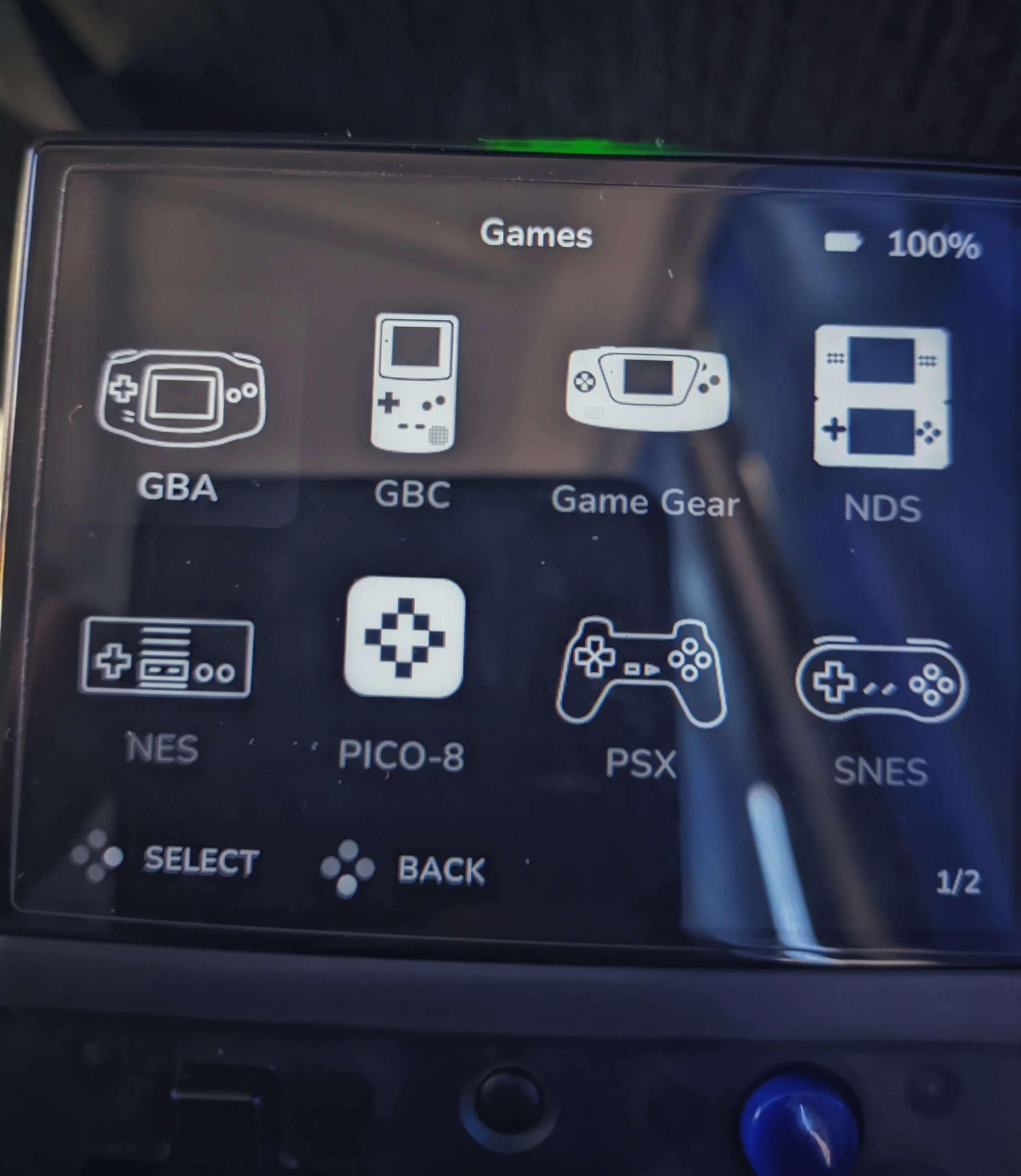
<p>Earlier today I shared the first bits of progress <a href="https://fosstodon.org/@joel/112456579661251554">on my Mastodon profile</a>. I used the Silhouette White Icon Pack by Dreambrace to know the resolution and style the icons should follow. There’s a repo with <a href="https://github.com/OnionUI/Themes/blob/main/generated/icons_standalone/index.md">the available icon packs for Onion-OS</a> in case you’re interested!</p>

<figure class="img">
  <picture>
    <source srcset="/assets/img/blogs/2024-05-17-the-first-few-icons-in-action.webp" type="image/webp" />
    <source srcset="/assets/img/blogs/2024-05-17-the-first-few-icons-in-action.webp" />
    <img class="mx-auto" src="/assets/img/blogs/2024-05-17-the-first-few-icons-in-action.webp" alt="The first few icons in action" />
  </picture>
  <figcaption class="caption">The first few icons in action</figcaption></figure>

<p>After sharing that progress, Donno, the creator and maintainer of Arcticons, allowed me to make it part of the project in a repository under the Arcticons-Team mantle! You can access the repo <a href="https://github.com/Arcticons-Team/Arcticons-Miyoo">here</a>.</p>

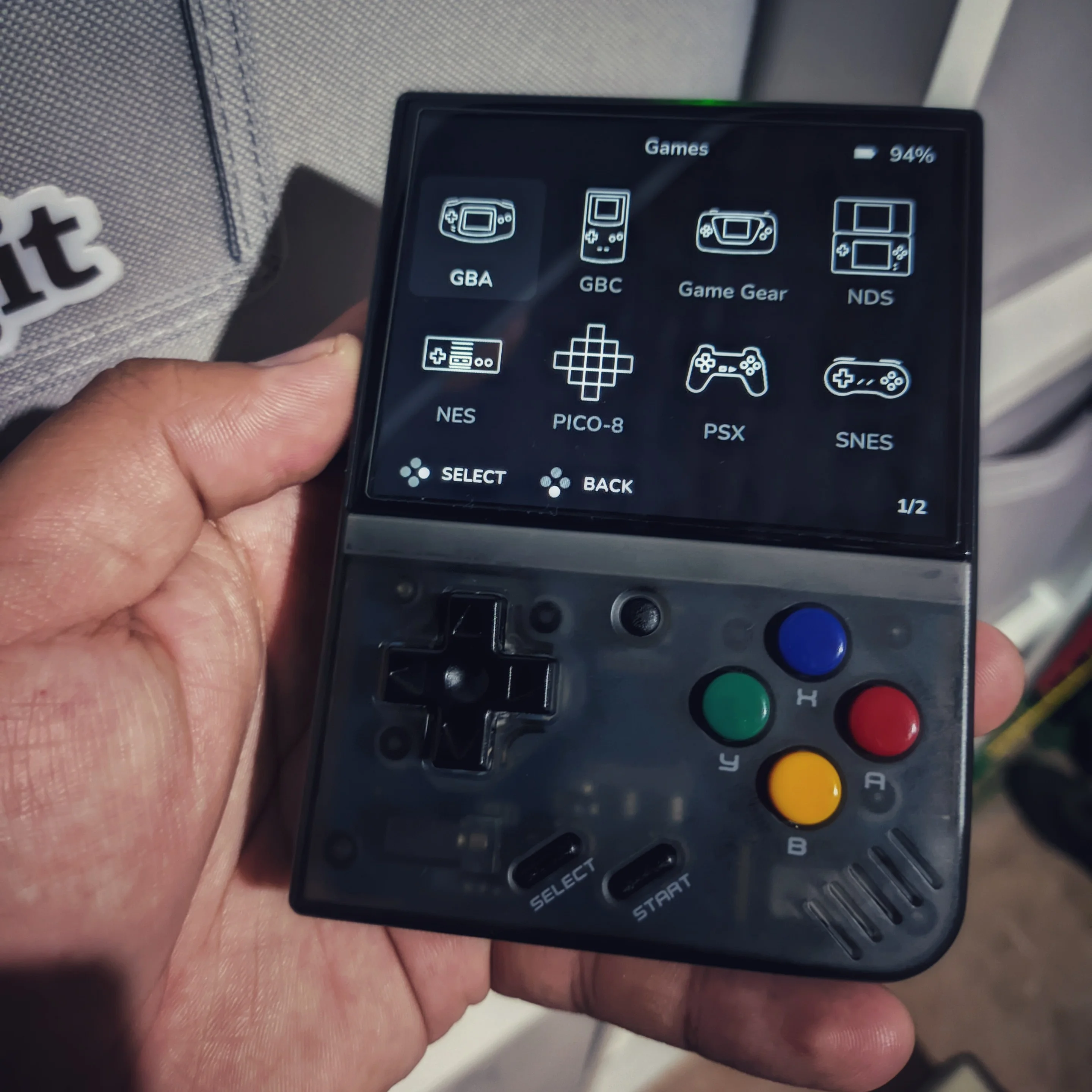
<p>After getting back from work, I ended up doing a many more icons, but there is still quite a way to go! According to the website, there is a total of 55 icons in Onion OS. So we are a third of the way or so.</p>

<figure class="img">
  <picture>
    <source srcset="/assets/img/blogs/2024-05-17-icon-pack-applied-on-my-miyoo-mini.webp" type="image/webp" />
    <source srcset="/assets/img/blogs/2024-05-17-icon-pack-applied-on-my-miyoo-mini.webp" />
    <img class="mx-auto" src="/assets/img/blogs/2024-05-17-icon-pack-applied-on-my-miyoo-mini.webp" alt="Icon pack applied on my Miyoo Mini" />
  </picture>
  <figcaption class="caption">Icon pack applied on my Miyoo Mini</figcaption></figure>

<p>Arcticons are made inside of a of 48px square, so I had to generate the square-shaped PNG files, and then add empty space to fill the ideal resolution for the Miyoo Mini Plus of 120x130px. I used ImageMagick to generate a blank slate ot that size and then put the icon in the top center, whic worked out great.</p>

<p>I’ll admit I was a bit lazy and ended up using ChatGPT to generate a code to do this for me, I did some modifications to it but still, better to just be honest.</p>

<div class="language-bash highlighter-rouge"><div class="highlight"><pre class="highlight"><code><span class="c">#!/bin/bash</span>

<span class="c"># Check if Inkscape and ImageMagick are installed</span>
<span class="k">if</span> <span class="o">!</span> <span class="nb">command</span> <span class="nt">-v</span> inkscape &amp;&gt; /dev/null
<span class="k">then
    </span><span class="nb">echo</span> <span class="s2">"Inkscape could not be found. Please install it first."</span>
    <span class="nb">exit </span>1
<span class="k">fi

if</span> <span class="o">!</span> <span class="nb">command</span> <span class="nt">-v</span> convert &amp;&gt; /dev/null
<span class="k">then
    </span><span class="nb">echo</span> <span class="s2">"ImageMagick could not be found. Please install it first."</span>
    <span class="nb">exit </span>1
<span class="k">fi</span>

<span class="c"># Create output directory</span>
<span class="nb">mkdir</span> <span class="nt">-p</span> icons

<span class="c"># Generate duplicate entries sharing the same SVG</span>
<span class="nb">cp</span> <span class="nt">-v</span> sfc.svg sufami.svg
<span class="nb">cp</span> <span class="nt">-v</span> sfc.svg satella.svg
<span class="nb">cp</span> <span class="nt">-v</span> md.svg segacd.svg

<span class="c"># Loop over all SVG files in the current directory</span>
<span class="k">for </span>svg_file <span class="k">in</span> <span class="k">*</span>.svg<span class="p">;</span> <span class="k">do</span>
    <span class="c"># Remove file extension for the output file name</span>
    <span class="nv">base_name</span><span class="o">=</span><span class="si">$(</span><span class="nb">basename</span> <span class="s2">"</span><span class="nv">$svg_file</span><span class="s2">"</span> .svg<span class="si">)</span>
    
    <span class="c"># Convert SVG to PNG (preserving aspect ratio)</span>
    inkscape <span class="s2">"</span><span class="nv">$svg_file</span><span class="s2">"</span> <span class="nt">--export-type</span><span class="o">=</span>png <span class="nt">--export-width</span><span class="o">=</span>110 <span class="nt">--export-height</span><span class="o">=</span>110 <span class="nt">--export-filename</span><span class="o">=</span><span class="s2">"</span><span class="k">${</span><span class="nv">base_name</span><span class="k">}</span><span class="s2">_temp.png"</span>
    
    <span class="c"># Create a new PNG with dimensions 120x130 and place the icon image at the top center</span>
    convert <span class="nt">-size</span> 120x130 xc:none <span class="s2">"</span><span class="k">${</span><span class="nv">base_name</span><span class="k">}</span><span class="s2">_temp.png"</span> <span class="nt">-geometry</span> +5+0 <span class="nt">-composite</span> <span class="s2">"icons/</span><span class="k">${</span><span class="nv">base_name</span><span class="k">}</span><span class="s2">.png"</span>
    
    <span class="c"># Remove temporary file</span>
    <span class="nb">rm</span> <span class="s2">"</span><span class="k">${</span><span class="nv">base_name</span><span class="k">}</span><span class="s2">_temp.png"</span>
<span class="k">done</span>

<span class="c"># Delete duplicate entries</span>
<span class="nb">rm</span> <span class="nt">-v</span> satella.svg sufami.svg segacd.svg

<span class="nb">echo</span> <span class="s2">"Conversion completed. Check the 'icons' directory for the PNG files."</span>
</code></pre></div></div>

<p>So yeah, that is going to be a bit of work, during the following days I’ll add more entries to the repo, and feel free to contribute as well if you want to.</p>

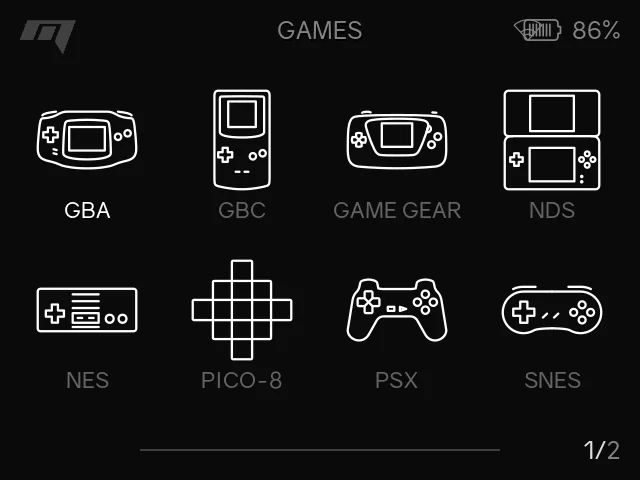
<figure class="img">
  <picture>
    <source srcset="/assets/img/blogs/2024-05-17-a-screenshot-of-arcticons-in-the-miyoo-mini-plus.webp" type="image/webp" />
    <source srcset="/assets/img/blogs/2024-05-17-a-screenshot-of-arcticons-in-the-miyoo-mini-plus.webp" />
    <img class="mx-auto" src="/assets/img/blogs/2024-05-17-a-screenshot-of-arcticons-in-the-miyoo-mini-plus.webp" alt="A screenshot of Arcticons in the Miyoo Mini Plus" />
  </picture>
  <figcaption class="caption">A screenshot of Arcticons in the Miyoo Mini Plus</figcaption></figure>

<p>This is day 48 of <a href="https://100daystooffload.com">#100DaysToOffload</a>, and post 16 for <a href="https://weblog.anniegreens.lol/weblog-posting-month-2024">#WeblogPoMo2024</a>.</p>]]></content><author><name>joelchrono</name><email>me@joelchrono.xyz</email></author><category term="design" /><category term="art" /><category term="gaming" /><summary type="html"><![CDATA[I decided to create an icon pack for the Miyoo Mini (or whatever other handheld can use them) and here's how.]]></summary><media:thumbnail xmlns:media="http://search.yahoo.com/mrss/" url="https://joelchrono.xyz/assets/img/blogs/2024-05-17-a-screenshot-of-arcticons-in-the-miyoo-mini-plus.webp" /><media:content medium="image" url="https://joelchrono.xyz/assets/img/blogs/2024-05-17-a-screenshot-of-arcticons-in-the-miyoo-mini-plus.webp" xmlns:media="http://search.yahoo.com/mrss/" /></entry><entry><title type="html">Using Jekyll’s collections to share origami</title><link href="https://joelchrono.xyz/blog/using-jekyll-collections-to-share-origami/" rel="alternate" type="text/html" title="Using Jekyll’s collections to share origami" /><published>2022-05-29T19:50:12-05:00</published><updated>2022-05-29T19:50:12-05:00</updated><id>https://joelchrono.xyz/blog/using-jekyll-collections-to-share-origami</id><content type="html" xml:base="https://joelchrono.xyz/blog/using-jekyll-collections-to-share-origami/"><![CDATA[<p>So I had been meaning to add different forms of content on my blog, having sections for stuff that I don’t really consider a proper blogpost, but I never really had the time, and I didn’t really generate enough diverse content for me to try setting it up, until recently.</p>

<p>I have been working for my University during the last few months, but I don’t really have to do a lot of the time, so I recently picked up on my oldest hobby, origami.</p>

<p>I love origami, and I’ve been meaning to talk about it almost since I started this blog, but I’ve not put much effort into even trying. But since I had done quite a lot of folds lately, and had already taken a bunch of pictures of them, all I had to do was put them together and organize them a little bit.</p>

<p>This is not a tutorial, <a href="https://jekyllrb.com/docs/collections/">Jekyll’s documentation is pretty decent on this topic</a>, so I’ll just share the small changes I did for my use case.</p>

<p>My <code class="language-plaintext highlighter-rouge">_config.yml</code> file had these lines added</p>

<div class="language-yaml highlighter-rouge"><div class="highlight"><pre class="highlight"><code><span class="na">collections</span><span class="pi">:</span>
  <span class="na">origami</span><span class="pi">:</span>
    <span class="na">output</span><span class="pi">:</span> <span class="kc">true</span>
<span class="na">feed</span><span class="pi">:</span>
  <span class="na">collections</span><span class="pi">:</span>
    <span class="na">origami</span><span class="pi">:</span>
      <span class="na">path</span><span class="pi">:</span> <span class="s2">"</span><span class="s">/origami.xml"</span>
</code></pre></div></div>

<p>I am using the <a href="https://github.com/jekyll/jekyll-feed">jekyll-feed</a> plugin, which should already be used by your blog if you provide RSS feeds!</p>

<p>After doing those changes I created an <code class="language-plaintext highlighter-rouge">origami.md</code> file in my website’s root directory that served as a template. It has some metadata that is not really that important but this is the main thing. You can always access <a href="https://github.com/joelchrono12/joelchrono12.ml">my website’s source code</a> too.</p>

<div class="language-html highlighter-rouge"><div class="highlight"><pre class="highlight"><code><span class="nt">&lt;div&gt;</span>
 <span class="nt">&lt;table&gt;</span>
  <span class="nt">&lt;tr&gt;</span>
    <span class="nt">&lt;th&gt;</span>Model<span class="nt">&lt;/th&gt;</span>
    <span class="nt">&lt;th&gt;</span>Author<span class="nt">&lt;/th&gt;</span>
    <span class="nt">&lt;th&gt;</span>Tutorial<span class="nt">&lt;/th&gt;</span>
    <span class="nt">&lt;th</span> <span class="na">style=</span><span class="s">"text-align: right"</span><span class="nt">&gt;</span>Photo<span class="nt">&lt;/th&gt;</span>
  <span class="nt">&lt;/tr&gt;</span>
{% for origami in site.origami reversed %}
  <span class="nt">&lt;tr&gt;</span>
    <span class="nt">&lt;td&gt;&lt;a</span> <span class="na">href=</span><span class="s">"{{ origami.url }}"</span><span class="nt">&gt;</span>{{ origami.title }}<span class="nt">&lt;/a&gt;&lt;/td&gt;</span>
    <span class="nt">&lt;td&gt;&lt;a</span> <span class="na">href=</span><span class="s">"{{ origami.creator.site }}"</span><span class="nt">&gt;</span>{{ origami.creator.name }}<span class="nt">&lt;/a&gt;&lt;/td&gt;</span>
    {% if origami.tutorial %}
    <span class="nt">&lt;td&gt;&lt;a</span> <span class="na">href=</span><span class="s">"{{ origami.tutorial }}"</span><span class="nt">&gt;</span>Yes<span class="nt">&lt;/a&gt;&lt;/td&gt;</span>
    {% else%}
    <span class="nt">&lt;td&gt;</span>No<span class="nt">&lt;/td&gt;</span>
    {% endif %}
    <span class="nt">&lt;td</span> <span class="na">style=</span><span class="s">"text-align: right"</span><span class="nt">&gt;&lt;img</span> <span class="na">width=</span><span class="s">"210px"</span> <span class="na">src=</span><span class="s">"{{ origami.image }}"</span>
    <span class="na">alt=</span><span class="s">"{{ origami.description }}"</span> <span class="na">title=</span><span class="s">"{{ origami.description }}"</span><span class="nt">&gt;&lt;/td&gt;</span>
  <span class="nt">&lt;/tr&gt;</span>
{% endfor %}
<span class="nt">&lt;/table&gt;</span>
<span class="nt">&lt;/div&gt;</span>
</code></pre></div></div>

<p>Now all I had to do was create files inside a directory named <code class="language-plaintext highlighter-rouge">_origami</code>, add some metadata in YAML format, in between dashes, and call it a day. Like the following example.</p>

<div class="language-yaml highlighter-rouge"><div class="highlight"><pre class="highlight"><code><span class="na">layout</span><span class="pi">:</span> <span class="s">origami</span>
<span class="na">header</span><span class="pi">:</span> <span class="s">Owl by Nguyễn Hùng Cường</span>
<span class="na">title</span><span class="pi">:</span> <span class="s">Owl</span>
<span class="na">creator</span><span class="pi">:</span>
    <span class="na">name</span><span class="pi">:</span> <span class="s">Nguyễn Hùng Cường</span>
    <span class="na">site</span><span class="pi">:</span> <span class="s">https://www.flickr.com/people/blackscorpion/</span>
<span class="na">tutorial</span><span class="pi">:</span> <span class="s">https://youtu.be/DExjwwnKCAY</span>
<span class="na">date</span><span class="pi">:</span> <span class="s">2022-05-05</span>
<span class="na">description</span><span class="pi">:</span> <span class="s2">"</span><span class="s">An</span><span class="nv"> </span><span class="s">Owl</span><span class="nv"> </span><span class="s">with</span><span class="nv"> </span><span class="s">a</span><span class="nv"> </span><span class="s">great</span><span class="nv"> </span><span class="s">3D</span><span class="nv"> </span><span class="s">look,</span><span class="nv"> </span><span class="s">really</span><span class="nv"> </span><span class="s">smooth</span><span class="nv"> </span><span class="s">and</span><span class="nv"> </span><span class="s">clean</span><span class="nv"> </span><span class="s">looking."</span>
<span class="na">image</span><span class="pi">:</span> <span class="s">/assets/img/origami/owl_nhc.jpg</span>
</code></pre></div></div>

<p>So, anyways, its pretty simple to do. I wanted to get back into writing since it had been a while, so this is pretty much it. Thanks for reading!</p>]]></content><author><name>joelchrono</name><email>me@joelchrono.xyz</email></author><category term="art" /><category term="blog" /><category term="webdev" /><category term="jekyll" /><summary type="html"><![CDATA[I created a new section on my website to share my origami posts, which have taken over my Mastodon account lately. I decided to have a section where I share pictures of them and tutorials (if available).]]></summary></entry><entry><title type="html">Detox Day</title><link href="https://joelchrono.xyz/blog/detox-day/" rel="alternate" type="text/html" title="Detox Day" /><published>2021-08-03T20:33:13-05:00</published><updated>2021-08-03T20:33:13-05:00</updated><id>https://joelchrono.xyz/blog/social-media-detox-day</id><content type="html" xml:base="https://joelchrono.xyz/blog/detox-day/"><![CDATA[<h1 id="social-media-and-me">Social media and me</h1>

<p>So, social media has been quite useful for humanity, however, it has also become a big problem among people of all ages and demographics. Personally, I have been affected by it differently as I grow up and develop my thoughts and lifestyle.</p>

<p>The first contact I had with social media, was MSN Live Messenger, I used to talk to people I knew, play online games and of course, ping them constantly until I had an answer from them!</p>

<p>But I was just a little kid, and I only talked to family or friends from school. I was still inside this little bubble where I had no real idea of how big the internet could be. I also had a Club Penguin, but despite being in a multiplayer environment, the social aspect of it flew over my head at the time.</p>

<p>It was not until middle school, that I got an android device, I got Whatsapp, and got engaged into looking for apps and customization. At one point, I created a Facebook account. I was not allowed to have one, and I felt incredibly guilty the moment I did it, so I actually did not use it for years.</p>

<p>However, after I got permission to use it, I ended up pretty addicted to it, I joined different groups and follow random pages that were popular or that I heard from classmates at school. Some of them were fine, others were a little bit to edgy, and I was constantly distracted by memes and mostly useless posts. As I grew up, I started to delete old groups and follow more meaningful topics for me. And of course, due to all of this, I was feeding Facebook with personal data and ad revenue.</p>

<p>At some point I realized how problematic this was for my life. I managed to stay with good grades and keep up with real life shenanigans. But I still felt attracted to my phone and to Facebook.</p>

<p>I would like to say I stopped using Facebook because I started to use my phone and social media less. But no, looking back, the reason I did, was because I started to learn English, and I joined Reddit. I had heard of it for a long time, and it was actually pretty amazing. I started to see how most of the memes I saw in Facebook where born there, I got interested by the sense of anonymity and separation. How nobody cares about you, but the content being shared in the subreddits.</p>

<p>I joined a few communities related to my interests, Doctor Who, Origami, but I also joined a bunch of places full of toxicity and gossip. Yeah it was nice to see how news and memes came out here first, seeing how Youtubers got ideas for their videos and stuff like that. But at the same time, I started to be surrounded by politics, debates, conspiracies and a lot of weird things that I was not really interested in seeing, and yet, there I was. I am probably going to clean up my subreddit list one of these days, or just start from scratch with a new account. It is kinda amazing how powerful reddit’s Karma can be, I have a decent amount, and only because of that I have doubts about getting rid of my account, even though it has no real value.</p>

<p>At some point I also had a Twitter account, but I successfully deleted it. I have to say I only had it to participate in Giveaways of app codes and such, and I actually won a couple times, but well.</p>

<p>Anyways, after I grew aware of how most of social media disrespects my privacy, I ended up looking for alternatives, and I found Mastodon, which a social media app similar to Twitter, which can be self-hosted, so all of your data stays with you. Or you can join instances hosted by people you are willing to trust. The point is, there is no single centralized server where everything you do is tracked. At first, I decided to join a bunch of instances, since I did not know how federation actually worked back then. I have found some nice people, and I have been inspired to do things to improve my life, like making this website! Thanks to it, I have a way to share my thoughts without having unwanted eyes all over my data. Of course, anyone could scrap this and make some profile to identify me, but well, I am saying this willingly, without having to abide to any terms of service. Even if Netlify or GitHub, where this is site is hosted, have anything against me, I can at least keep all of my information locally and host it somewhere else.</p>

<h1 id="detox-day-log">Detox Day Log</h1>

<p>Anyways, the original reasoning I made this post was to share what I was going to do during this day. Besides writing this blog, I have spent quite some time contributing some icons to the Arcticons Icon pack, while listening to podcasts on YouTube and AntennaPod.</p>

<p>Being honest, I opened Mastodon for about 4 minutes until I remembered which day it was, and I also opened Reddit for 8 minutes because I forgot again. But other than that, I have avoided social media, enabled Do not disturb, deleted some apps. I even decided to leave Nova Launcher, which has been my choice for years, and tried out Olauncher once again! I hid all of my those distracting app icons and ended up with a pretty sick looking setup, if I do say so myself.</p>

<p>After some though, I’ve also requested my data from Reddit. There is no way to export my data from the usual settings menu, but it can requested via <a href="https://www.reddit.com/settings/data-request">this link</a>. I’ve decided to finally delete my account. Having a history and social media points is not that important, and some peace of mind should be quite good.</p>

<p>After listening to the latest episode of Darknet Diaries, which is about the problems someone got because of having a good Instagram username. The fact that an account can be that valuable is mind-blowing! Thankfully none of the usernames I’ve used are worthy enough for someone to harass me because of them.</p>

<h1 id="finishing-thoughts">Finishing thoughts</h1>

<p>So, I started writing all of this yesterday, during Detox Day, and this final words are done a day after. I hope this movement takes off, in my case, I did not found a lot of movement in my country and language, although that might be because Facebook and other common social media I don’t use are more common here. Anyways, I found myself having a decent time, but I have to admit I spend quite a lot of it on YouTube, but it was not that bad, since I mostly use it as background sound and, as previously stated, to listen to a few podcasts and long videos that are only available there.</p>

<p>I deleted my Reddit account, funnily enough, the exported data only occupies a couple megabytes, since it does not include the images and videos, just csv files and hyperlinks. I think I will keep most of the posts and comments there since they don’t contain any compromising information. This is mostly about getting rid of social media and less about gaining privacy, although it is a nice plus. I’ve also exported my Instagram data, and I might delete it sometime soon.</p>

<p>The journey has been difficult, but I am happy with my progress. This has been day 51 of <a href="https://100DaysToOffload.com">#100DaysToOffload</a></p>]]></content><author><name>joelchrono</name><email>me@joelchrono.xyz</email></author><category term="lifestyle" /><category term="art" /><category term="design" /><category term="ramble" /><category term="detox" /><summary type="html"><![CDATA[I decided to share about the different things I did during my little detox of social media which happened yesterday. as well as my story since the MSN Live Messenger days...]]></summary></entry></feed>