Jekyll2024-05-19T22:49:09-06:00https://joelchrono.xyz/feeds/android.xmlJoel’s Log Filesjoelchronojoel.chrono@disroot.orgMy Home Screen (Early 2024)2024-04-17T21:26:45-06:002024-04-17T21:26:45-06:00https://joelchrono.xyz/blog/my-home-screenI did a post about what’s on my phone late last year, but I felt like sharing my current homescreen setup too, this was inspired by @brendon’s homescreen post.
Although I’ve shared some screenshots before, I’ve never really done full showcase of the whole thing with my gestures and shortcuts. So here it is!
The screens
My lockscreen and my homescreen side by side
The lockscreen doesn’t have anything special, but it’s there.
My current homescreen is quite simple. My setup is a single screen with a 12 by 7 grid, with a total of 15 app icons for quick access. I have the default clock widget on top that also shows the date and upcoming alarm. I also disabled the dock—I don’t have any use for it.
The icons I use are from Arcticons, a free and open source icon pack that I have contributed to for a few years already.
The apps
Anyway the apps I have on my homescreen are sorted in 5 columns with 3 rows each. Every column has a certain type of apps in it.
My most important apps are the ones closer to my right thumb, which are my default Phone app, Mihon for manga reading—an alternative to Tachiyomi that is the reader alone a integrated way to get the plugins to access manga from websites—and AntennaPod for Podcasts.
Making use of Nova Launcher’s shortcut gestures, some apps have an extra app I can access by swiping the icon up and down. Swiping down on Mihon will open Librera Reader, my book reader of choice, whenever I don’t use my Kobo. Swiping down on AntennaPod will open YT Music, and up will open Gramophone—or whatever local music player I use, I switch often.
My third column has apps that entertain me, which includes Tusky for mastodon and fediverse accounts (also a gesture for Bluesky), then Brawl Stars because I play it a bit. Cromite is there too (with a gesture for Firefox as well).
Next is my media column, which has Fossify Gallery, Binary Eye, to scan barcodes (for work) and Solid Explorer for file management, that is one of the few apps I paid for—back when I didn’t have a job for stuff like that—and has been worth every penny.
Finally, the last column has whatever other apps I use sometimes, which is KeepassDX (with a gesture for Aegis Authenticator), FeedMe, my feed reader of choice for Android since it integrates with my FreshRSS server, and Droid-ify (with a gesture for the regular Play Store).
All in all, I have access to a ton of apps with just 15 icons in my homescreen.
Final thoughts
You may notice the abscence of WhatsApp and YouTube, which some of my regular readers might expect since they show in my usage stats every month. I actually have a gesture for them rather than an icon, so swiping up and down with two fingers will open one app or the other!
So, yeah, now you have seen through me. These are the icons and apps I use in my setup, quite a lot of stuff packed together, but the result is rather minimal I think.
]]>joelchronojoel.chrono@disroot.orgApple vs Android on Security and Features2024-02-29T21:47:46-06:002024-02-29T21:47:46-06:00https://joelchrono.xyz/blog/apple-android-security-and-features
Apple vs Android: Why Apple is the Clear Winner in Security and Features
Smartphones have become an indispensable part of our lives. When it comes to the two major players in the market, Apple and Android, there’s no denying that Apple stands out as the clear winner in terms of security and overall features...
Yes I just stole that upper embbeded post thingy from Kev’s site.
Recently Kyle did an editorial piece on Apple, which is, in my opinion, quite interesting to say the least. After reading it a while ago and once again when writing this, I still think that Apple is NOT the clear winner in security and features.
This is going to be a bit of a rant, I ain’t gonna lie, but sometimes, you have to correct things you know are wrong. But hey, maybe I am not correct in many things either so, feel free to respond to this too.
Kyle, I am very grateful for everything you as a developer, and also co-administrating a pretty cozy instance on Mastodon, but this article didn’t really have that many good points—in the opinion of an Android fanboy such as me, lol.
So, since this is my blog, I’ll just write the reasons I consider many of the arguments brought up in this case are wrong—from a certain point of view.
Security
I have to admit, that in a way, Security is the one factor where Apple has a certain advantage, but does it really?
Apple is a closed ecosystem, so, once its compromised, we have to rely on them to fix it. With Android, we can switch, we can upgrade, we can build from source, we can remove system apps and do whatever. Of course it is not always easy and its a burden on the regular user—one does have to get to work and get dirty with some things.
Also, in Android we can usually get apps (at least the FOSS ones) directly from developers and whatever distribution methods they provide (GitHub, F-Droid, Websites), without having to rely on the app store itself. This argument could be used against a Distro Repository, or F-Droid itself. But I would rather trust people and systems I can even contribute to, instead of a corporation.
Apple has a single point of failure and we have to put all our trust in them, simple as that.
Features
I mean, Android has more features—and it is much more flexible. There is simply no comparison. When it comes to interface and design, it is just a matter of taste. Both old and young people can struggle using an Apple device just as much as they struggle with Android. And you can get Android phones with physical keyboards, different screen sizes and features according to your needs.
Apple likes to refine things to a level that sometimes makes no sense, and then they also like to pretend it never existed. Just look at the dynamic island, have you ever heard of any new uses for it since it came out? And look at widgets, they maybe more fancy, but they are nowhere near as useful as on Android, and their potential is very limited, they end up unnoticed and underused, unless they can make money out of it, I guess, like getting rid of the headphone jack, or having a bunch of MagSafe add-ons.
Privacy
Privacy is a matter of scope nowadays, you can’t be fully private if you have a connection to the internet, but you can choose who you want to be private from.
I don’t trust Apple with my data, and I don’t trust Google with my data. Or maybe I do, I have YouTube, I can use YouTube, but I can also use a frontend for it if I want, which can also serve as a proxy and anonymize me.
But wait! Apple won’t let you install those app frontends like Newpipe or so. At least you can use the brower you want to check websites frontends right? NO, gotta stick to Safari. Or you can use a skin that is just frontend of Safari to watch a frontend of YouTube of course, very fun!—alright enough getting off topic.
Similarly, Android can be used in its AOSP form thanks to a good amount of custom ROMs, maintained by the community. Of course, you have to trust those random developers. But again, I’d rather trust them than Apple or any corporation.
Yes Apple has a bunch of privay claims and they somewhat fulfill them, but it really feels like a marketing strategy rather than something they do just because it is the right thing to do.
Compatibility
Android apps can support multiple Android versions, you can still install modern versions of many apps on Phones running versions like Android 8 (Oreo) or even older.
I may be wrong, but I think that as soon as an iOS version stops getting support, there are really no more app updates for it. Of course they give you a lot of updates for a long time, but Android is catching up on that regard too! At least with some vendors. Not to mention custom ROMs.
While interactions between devices is not as smooth as what Apple can do. Android has a lot of apps that help achieve similar functionality. Kyle mentions the seamlessness of Google products and services, but I don’t use either of them. I can do wit DAVx5 (Calendar and contact sync), Nextcloud (Cloud file storage, also interacts with DAVx5), KDE Connect (Computer and phone sync, share clipboard, and a lot more), Syncthing (Cloudless file sync) and similar tools that get the job done in many regards. And a bunch of these 3rd party apps can’t even work on iOS, so you are stuck with what Apple offers you and not much more.
App Store
App Store is controlled by Apple and they are evil.
Play Store is controlled by Google and they are evil.
Apple is barely following EU regulations in the worst possible way regarding their walled garden practices, and I don’t think any upcoming new changes they may have to do will still make it worth it.
Android let’s you install apps from 3rd party sources. You can use F-Droid (FOSS app store, I recommend the Droid-ify client), Obtainium (Fetch app updates from multiple sources, usually the developers themselves), Aurora Store (Get apps from Google servers, without a Google account), and many other options, some more trusted than others, of course.
There’s a lot not to like about Android as it is offered by Google and OEMs, but the community behind it offers a bunch of ways to stray away from the surveillance and data mining that goes on. Apple says they do things, and we have to trust them, but when they don’t, who can hold them accountable anyway? I just don’t trust Apple, and Google sucks too.
Finishing up
Give up on Google, give up on Apple, give up on an easy life and just install a Custom ROM on some random Xiaomi phone while you can, or get a used Pixel that works just as well if not better.
Just kidding, I have Google on my phone, I have to use banking apps now and I gave up on my privacy and freedom and we are all doomed.
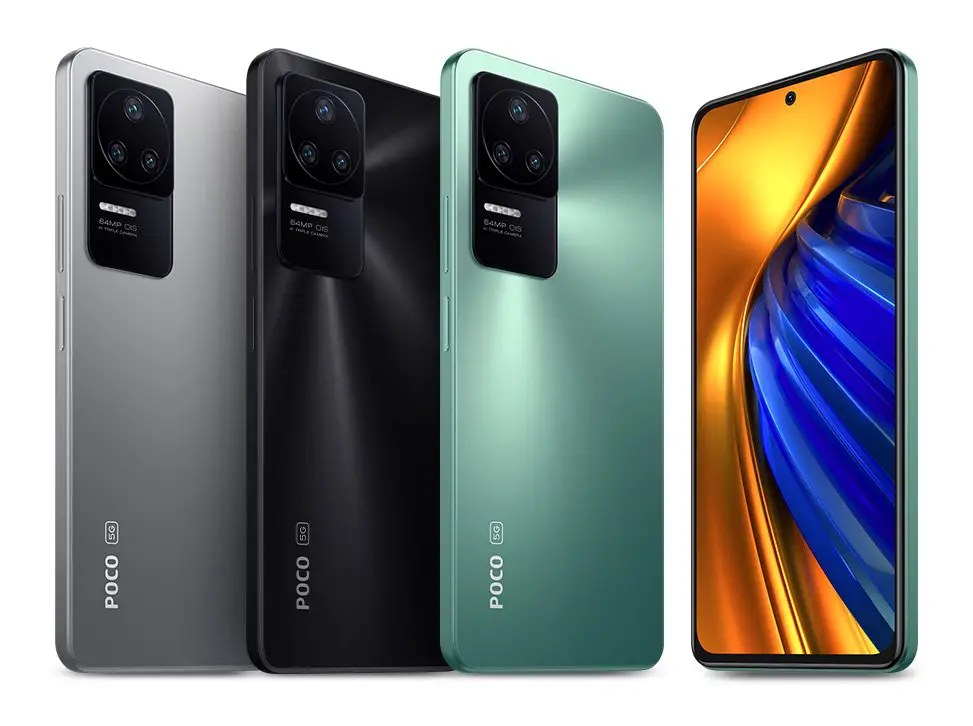
]]>joelchronojoel.chrono@disroot.orgNew Phone Experience2023-11-11T23:20:00-06:002023-11-11T23:20:00-06:00https://joelchrono.xyz/blog/new-phone-experienceAfter quite a bit of waiting, I finally decided to buy myself a new phone, it wasn’t a Pixel sadly, I decided to go for the Xiaomi Poco F4. This phone was released on June of last year, and it was not as well received because it has the same processor as its predecesor. But since my previous phone (Redmi Note 8) had not only an older, but midrange processor, I knew it would not matter to me.
I was right, as soon as I got the phone, I got to experience some of the nice things that new phones today can offer, such as a 120 Hz refresh rate, an OLED screen, a power button fingerprint sensor and a faster performance overall.
The Proprietary Week
As soon as I got this phone I had to go through the painful process of waiting for a week to be able to unlock my bootloader and free this phone from its painful stock MIUI rom.
However, I wasn’t going to not use it right? So I decided to try living with it and test things out despite the not so great stock experience.
Thankfully, despite it all, Xiaomi lets you disable pretty much every ad shown to you, and I was able to hide almost all of their annoyances, install Nova Launcher and do some other things to get closer to the AOSP experience.
The day to day experience was fairly smooth and felt quite lightweight, against my expectations, if it wasn’t because of the huge amount of annoying pop-ups and warnings showing up everytime I wanted to give any kind of permission to any app that did anything Xiaomi didn’t like.
As the saying goes: “A monkey in silk is a monkey no less”. Despite it all, I felt so dirty trying to cover up the reality, not to mention the surveillance and tracking going on in the background at every moment.
Because I was going to end up transferring all my data to this phone after installing a clean AOSP based rom, I didn’t install stuff such as Signal or WhatsApp, which meant I was carrying two phones for this week. That was annoying but it was a sacrifice I was willing to endure during this time, for the sake of a better future for myself
And finally, that future arrived.
Custom Roms to the rescue
After I was able to unlock my bootloader, I immediately did a quick backup of the few apps I actually installed—Tachiyomi, K-9 Mail and AntennaPod, pretty much. I proceeded to follow a guide online to install ArrowOS—the same rom I had on my Redmi Note 8—and I finally felt free.
Everything went smoothly during the installation, this is the first time this happens to me, there has always been some problem, but I guess I’m already a pretty experienced Android rom user, so I know the drill.
Of course, even if the installation went smoothly, I was expecting to find some bugs or functionality to be broken. In my case, the fingerprint sensor worked at first, but after setting up my fingerprint, the phone crashed and restarted. This happened only a couple times and since then it works as expected.
Another slight annoyance is the AOSP camera—it is quite useless. However, installing Simple Camera from F-Droid managed to overcome those issues, although I do not have access to the wide angle lens anymore. I have also tried to use the GCam, Leica Cam and other options. For now I don’t feel too pressured into getting this working properly, I’ll survive.
Overall though, the phone feels a lot smoother and lighter than before, most things work perfectly fine. This time I decided to install the rom edition with GAPPS preinstalled, because I needed them to get some apps working. However, The apps that came installed were just minimal—and also YouTube. 😬
Final Thoughts
Installing the stuff I use to have my setup working, like DAVx5 and Syncthing as well as the other apps was simple enough. It’s great to see all of my data being synchronized with such ease. It helps that I didn’t have to override anything, like I used to do when installing new roms in the same phone.
A Fun Fact that I didn’t know: Signal lets you transfer everything from one phone to another without any trouble at all, it was fast and simple and I’m glad I decided to check the settings and looking for exporting tools. WhatsApp can do that too—but nobody cares.
I am happy to say KeepassDX is still great, logging into stuff is a breeze, especially with their Magikeyboard feature that works in some of those apps that won’t let the autofill thing work properly.
Sadly, this phone does not have as many roms as the Poco F5 or the Poco F3, since it didn’t get too many sales when it came out. Still, development is slow and steady and I hope that the very few bugs I’ve encountered get fixed soon enough.
]]>joelchronojoel.chrono@disroot.orgStill using Gboard2023-10-10T10:30:00-06:002023-10-10T10:30:00-06:00https://joelchrono.xyz/blog/still-using-gboardYesterday’s post was written on my phone, and that’s the case today. It honestly doesn’t take that much time to do it here compared to my laptop, because what limits my typing speed is not how fast I type, but how much time I spend thinking on what to write next.
This makes it so typing on a phone is not so bad of an experience, but the other factor is GBoard.
As a FOSS enthusiast, I tend to favor using FOSS apps on my phone. The reality is that quite a bunch of the alternative keyboards simply aren’t good enough, it wasn’t always that way though…
My story with phone keyboards
I’ll skip the T9 keyboards and the non-android phones, I already wrote about the phones I’ve had. All I remember is that at some point I tried predictive T9 and it was so fast it was amazing, but those times are long gone now.
In the beginning, the weird Chinese phone I had was the worst thing ever, it wasn’t a modern touch screen, I could push too hard and it would leave a mark, it also had no multi-touch functionality at all. I just used the default keyboard because the thing only had like 512 MB of storage.
The HTC Status had a pretty decent physical keyboard, it was not bad, but the keys were kinda mushy and it was getting worse over time. Regardless, it was pretty nifty and I was able to program all the keys on a GBA emulator and play games like that. It kinda sucked but I did it anyways, and for a turn based rpg like Pokemon, it didn’t matter how responsive those things were.
From there I got a Galaxy S3 mini, handed down by my dad. This phone was where I explored a bunch of different keyboard options all the time. The thing was rooted and modded to oblivion, it actually died because of that. Back then, my favorite keyboard was Fleksy, the ability to hide the space bar and use just gestures to move around was fantastic because of the small screen factor and the responsiveness of it all.
Sadly, later updates have made some random changes that I am not a fan of, they started trying to implement swipe typing (like most keyboards) instead of improving their existing gesture method, and it kinda broke it all.
After Fleksy, I became a huge fan of Openboard, it had some of the nice gestures of Gboard without all the fuss, it worked wonderfully and I didn’t have a need for much else for quite a while. However, something started to change…
Switching to GBoard
I started to write in English more. After I started to interact on more diverse places like Discord and eventually Mastodon, I had the need to switch between keyboard languages, and Openboard or Fleksy just didn’t cut it anymore, nothing did.
That’s when GBoard won. Swiftkey was a contender and I’ve tried it multiple times, for months, but I just love the features and the smoothness GBoard brings. The Material You theming, the predictions and suggestions, and of course the fact that I don’t need to set my keyboard in a language or another, it will just work as I expect it to do so.
I would love to tell you I have it all locked down and without internet access, but honestly I just install it and don’t think much about that. It respects the privacy mode while filling password fields or using certain apps and the word suggestions just get better and better. The clipboard feature is also pretty good, as well as the built-in translator. So far it’s been a few years old things working just fine…
I still keep an eye on the FOSS alternatives, but it is how it is. 🤷♂️
This is post 70 of #100DaysToOffload. Have a good rest of your day, fellow reader. 😊
]]>joelchronojoel.chrono@disroot.orgWhat’s on my Phone (Fall 2023)2023-09-18T08:32:02-06:002023-09-18T08:32:02-06:00https://joelchrono.xyz/blog/whats-on-my-phone-fall-2023Hey! What’s on my phone videos are the kind of thing I am always looking for on YouTube. I miss the times when Youtubers like Marques Brownlee would do videos talking about the apps they used, I enjoyed them quite a bit, although they got kinda repetitive. But I still decided to do my own blogpost about it.
Interestingly enough, most of the people doing these videos are female iPhone or Samsung owners who are usually kpop fans, they use tons of social media apps, camera filters, video editors. They’ll even mention the case they’re using, the stickers or pictures of their favorite idol they have on them and stuff like that which I honestly don’t care about. There’s nothing bad about any of this, it’s simply not interesting to me anymore.
Whatever, some of these already are in my uses page but others are not as important, but may be interesting to you. I’ll try to categorize the apps, but let’s start from the top.
I am currently using ArrowOS since its one of not so few official ROMs still supporting my device. It is a great rom with quite a lean set of features, more focused on performance than customization.
The apps
Most of my apps are indeed FOSS, but I still have some proprietary apps, I’ll make some keys to mark them a bit more, and also split them in categories. I am completely copying this from Dom Corriveau’s blogpost, which happened to have some great ideas when it comes to organizing this huge list, so there we go.
Categories
🐧 = Availabe on F-Droid
🔗 = Available on GitHub or website
🤖 = Only on Google Play
📱 = Stock app that comes with the device
Everyday Use
🐧 Aegis Authenticator: 2FA manager with a nice interface and easy to backup.
🐧 AntennaPod: Podcast app, keeps stats and its FOSS so I like it.
🐧 Daily You: Take a picture per day and track how you feel, I didn’t think this would stick but I’ve been going for a week!
🐧 K-9 Mail: E-mail client with constant updates, encryption, and everything I need.
🐧 KeepassDX: Password manager.
🐧 MJ-PDF: A pretty lightweight pdf reader that just works.
🐧 Readrops: My FreshRSS client of choice, I also like FeedMe
🐧 Signal: I really love chatting with the 3 contacts I have who use this.
🐧 Solid Explorer: A fantastic file manager, what I like is that it shows folder storage size and has some other nice features.
🐧 Tachiyomi: Best manga app, supports many sources and has tons of features and progress tracking support.
🐧 Tusky: A Mastodon client that has been around forever.
🐧 Vivaldi: My current browser, snappy and fast, but Chromium based.
🤖 Facebook Lite: All of Mexico uses this, sadly.
🤖 Spotify: I listen to music here, it is how it is, for now…
🤖 WhatsApp: All of Mexico uses this, sadly.
App Stores
🐧 Droid-ify: A modern and secure F-Droid client.
🐧 Obtainium: Fetch updates for apps available from any git repo and other sources.
🐧 FF Updater: Get updates for Firefox and other browsers, I get Vivaldi from here. Could probably just use Aurora Store.
🐧 Aurora Store: Alternative to the Play Store, it can even download the apps you paid for.
Entertainment
Social media, videos and stuff that entertains me, and sometimes annoys me.
🐧 Eternity for Lemmy: A fork of Infinity that uses its interface but has Lemmy as a backend
🐧 Librera Reader: Reading books is something I don’t do as often nowadays, but this reader is great.
🐧 Newpipe + Sponsorblock: A Youtube frontend alternative with a lighter interface and intergration with Sponsorblock.
🔗 Aniyomi: Anime is fun, but I don’t watch it as often as I read manga.
🤖 Bluesky: I use this from time to time, mostly to keep getting invite codes and giving them away to people on Mastodon.
🤖 Mercado Libre: Basically latino Amazon with better interface, I like to scroll and see stuff I could buy.
🤖 Threads: This has stayed on my phone somehow. It is kinda fun to scroll now that the Following tab exists.
Comms
The services I use to communicate with friends, family, work and internet strangers.
🐧 Threema Libre: I really love talking to the three wonderful people I know who use this messaging app.
🐧 Telegram FOSS: There are too many cool groups on Telegram, I also have like 3 people I haven’t really talked to in a while there.
🤖 Discord: The communities here are also quite good, but I need to do some spring cleaning, too many servers.
🐧 Mattermost: The app is still in Beta, I use it to access Fosstodon’s patreon and moderation chat rooms.
🐧 Monocles Chat: The XMPP client I use nowadays, yet another fork of Conversations.
🐧 Proton Mail: I still have Proton Mail for some use cases.
🐧 SmallTalk: This Matrix client actually has a nice interface and is kinda responsive, but it’s still super bare bones.
Linuxy
These app interact with Linux or help me manage my android system how I want
🐧 KDE Connect: I use this to easily transfer files between my phone and laptop. I also enjoy the clipboard sharing.
🐧 Nextcloud: A nice client that auto uploads pictures from my Camera folder to my Nextcloud and other things.
🐧 PlainApp: This is a fantastic program to access my phone data, contacts, media and anything you want by turning the phone into a simple web server, it comes with a great interface and TONS of features. It’s also an RSS reader, a ChatGPT client, phone screen mirroring and many other things.
🐧 DAVx5: This lets me sync my calendars and contacts from my Nextcloud server to my phone
🐧 OpenKeyChain: PGP support on my phone, I use it with K-9 Mail to encrypt emails to people.
🐧 Syncthing: Sync folders between devices, absolutely wonderful.
🐧 Tailscale: Private VPN, I use this to access my Raspberry Pi server (Nextcloud, FreshRSS, etc) without opening my ports or configuring my router.
🐧 Termux: A terminal emulator for Android, very powerful stuff.
Root
These apps need root access to work.
🐧 AdAway: Black ads using the hosts file, you can also use it as a VPN ad blocker without root.
🐧 Battery Charge Limit: The name says it all. I can limit the percentage the battery fills to, helps to expand its longevity.
🐧 DataBackup: This lets me create backups of any app, including the data. Useful for offline games and pretty much anything where you can’t log-in to recover stuff.
🐧 WiFi Password: View all my WiFi passwords with ease.
🐧 Androidacy Magisk Modules: Magisk removed their Magisk Modules repo so this is a alternative provider for those.
🐧 Magisk Manager: Makes it so I’m rooted, a must.
Multimedia
Whatever can access or create media and files.
🐧 Simple Gallery: This is the gallery I’ve used for years now, super fast and customizable.
🐧 Vinyl Music Player: A local music player which works alright.
📱 Camera: The camera app is the same as any Xiaomi phone.
🤖 Notebloc: A document scanner that is quite light once you get an ad blocker.
Games
What I play sometimes, interactive entertainment.
🐧 Lichess: Chess, online.
🐧 Lemuroid: A great FOSS emulator and game organizer for multiple systems.
🐧 Shattered Pixel Dungeon: A fantastic little rogue-like that is very fun. I’ve never gotten past the first three or so floors though.
🐧 Super Retro Mega Wars: A bunch of little mini games inspired by Atari and other classics, built with Godot!
🐧 Twisty Timer: A speedcubing timer, to track my times in 3x3 and other cubes.
🤖 Among Us: I just play this sometimes with IRL friends.
🤖 Brawl Stars: I also play this, a super simple yet fun online shooter with 3v3 and many other game modes.
🤖 Marvel SNAP: A great card game with seemingly simple mechanics that has tons of possibilities.
Customization
I like to rice my phone almost as much as I rice my laptop.
🐧 Arcticons Icon Pack: Beautiful line based icons, I’ve contributed a few.
🤖 Nova Launcher: The only launcher I can stay on, nothing else is enough for me.
Utilities
Other stuff that is useful to me or needed by the system or hardware I use. Kinda general.
🐧 ActivityWatch: Keep track of app and screen usage, very useful for my monthly summaries.
🐧 Cake Wallet: A Monero wallet, I don’t really have a lot of it but I’ve gotten a couple donations.
🐧 IconRequest: This app generates the information needed by icon packs to create requests.
🐧 MicroG: A Play services alternative that allows Google apps to work somewhat. Also push notifications for WhatsApp and other apps.
🐧 Shelter: Uses Android’s work profile to create a sandbox for apps, either to duplicate apps (like WhatsApp) or just keep them away from my other phone’s data (like Threads).
🐧 Tuner: Tune my music instruments and stuff.
🐧 UPM-FCM Distributor: Notification provider, a Unified Push distributor that works via Google’s FCM.
🤖 Google Keyboard: I just need multilingual support and decent prediction, so I decided to use this.
🤖 Headphones (for Sony): I use this for my earphones, it lets me change the EQ and other settings.
🤖 Snapseed: A great editor that has everything I need! Super lightweight too.
🤖 Timbre: A super simple media editor, cut , merge , convert, resize, split and other simple video and audio tools.
🤖 Typing Hero: A great app that expands text out of short keywords, great to write a bunch of stuff with just a few key presses. Saves tons of time.
🤖 Zepp Life: This is the app used by my Xiaomi Smartband, I don’t use it often.
📱 Calculator: It does things with numbers.
📱 Calendar: Set events, view the date and agenda.
📱 Clock: Tells the time, set alarms.
📱 Contacts: Manage phone numbers, addresses and people.
📱 Phone: Make calls.
📱 SIM Toolbox: Tools built into my SIM card or something.
Finishing thoughts
Alright I think this is pretty much it. I skipped some things like banking apps and such because nobody cares.
I get most of my apps from F-Droid, but remember to use the Droid-ify app client!
]]>joelchronojoel.chrono@disroot.orgLooking for a new phone2023-07-08T11:40:55-06:002023-07-08T11:40:55-06:00https://joelchrono.xyz/blog/looking-for-a-new-phoneThanks to my internship the opportunity to actually buy a good phone is actually at hand. The problem is, there doesn’t seem to be any good phones that actually have the stuff I really want…
Look, I still love to play around with custom roms and rooting, I know a lot of people have accepted reality and stuck with whatever comes by default on their phones, maybe disabling google services and other things like that.
Others have gone with a Pixel, and I’ve even seen FOSS advocates and Linux users, going for the iPhone and calling it a day, its a very sad, yet common ocurrence.
The options
What I want is very simple:
Under 400 USD
Excellent battery
Dual SIM
Micro SD sard slot
Rooting and custom roms
Good performance
That’s it. I don’t care about the camera, a small size would be nice but I don’t care too much, I don’t particularly mind if rooting is annoying or difficult as long as its possible. I have asked in some places and have noted down some of my options.
The Pixel 6 or 6A is the easy choice when it comes to rooting and custom roms, but I give up my sd card slot, it probably have to be used so the battery may not be best and I would also lose a physical SIM. Besides, the Pixel is not easily available in Mexico and signal issues are common with them, which is pretty sad, still I would love to try the huge ROM catalog available for this.
Another one that has been in my list is the Nothing Phone, it would be a fun one, but I would lose my SD card slot, still everything else seems to be there and the design would be super unique, the only problem is that it is over my budget, but I can save for a bit more without trouble. I would love to have this fun just because I would be the only one with it, but still, it does not have everything I want.
Then there’s Xiaomi, be it the Poco F5, or the Redmi Note 12 Pro or something like that, their phones are cheap, and they have everything except maybe the SD card slot in some options, also the amount of roms is not as big when the phone’s new, or maybe they’re only limited to MIUI variants. Its also a bit more annoying to root, you have to wait around a week to unlock the bootloader, but it is posible. I quite like their phones, and since I would be using roms their buggyness and adware would not affect me that much.
Final thoughts
Still, there are tons of other options to consider, maybe an older flagship device could be better, or a last gen Xiaomi phone too. Regardless, I am honestly not happy with anything. I think the only thing that would make this fun for me is if I go with the Pixel, give up on expansion storage and just enjoy the amount of personalization I will get out of it. Some people say they can have buggy updates, but I will be using my own roms and updating at my own pace anyways. If you have any phone suggestions please let me know!
Am I not supposed to have what I want? what I need?
]]>joelchronojoel.chrono@disroot.orgI want more FOSS Android Widgets2023-02-24T18:00:00-06:002023-02-24T18:00:00-06:00https://joelchrono.xyz/blog/no-idea-yetWidgets have been one of the main features of Android, many years before Apple introduced them to iOS around 2 years ago, seriously, I feel old. Apps like the now dead (so dead, that after returning to Play Store, and then dying again, nobody reupdated their articles about it being dead for good) Zooper Widgets had been around since forever, and a little later KWGT and KWLP showed up. Both of them allowed users to make their own widgets and customize them to the extreme. And after a pretty reasonable price, you could also import existing widget packs available in the Play Store. I am completely amused that nothing similar exists in Android that is also free software.
Maybe its patented, or something? Or maybe KWGT’s 5 million downloads are quite a low quantity for any developers to feel like there’s no market for this. Still, tools like Conky and Rainmeter still have quite a bit of activity as desktop widgets and monitoring tools, I am just, surprised.
Obviously I don’t want to force any devs to put work in something they don’t care about or whatever, I am just ranting to myself honestly. On yet another tangent, I found quite a nostalgic thread on XDA full of screenshots from people sharing their homescreens since 2009, and, well, its been quite a while since then and a bunch of the early posts are quite outdated. There’s a few people doxxing themselves back when Gallery widgets were a thing, but nowadays not even that is available in a presentable manner. Simple Gallery has a super bare widget, but, its not very good…
Anyways, widgets in general really need to make a comeback. PLEASE!, How is it that there is not a single RSS feed widget built-in on any reader available on F-Droid, why can’t we have a good player for AntennaPod with Material You, or at least make the cover art bigger. How is it that Gallery apps no longer have a single picture or carrousel mode widget? K-9 Mail’s widget is nice but it is still light mode only.
I am probably complaining too much for someone who is doing nothing about it, I know. But I just want this to come back. iOS is honestly winning right now, at least when it comes to quickly displaying information at a glance, all the widgets are cohesive and look nice. Even if they still don’t have the amount of power Android’s can manage, like scrollable content and other features.
After playing around with the proprietary KWGT app, you can actually make a pretty functional RSS widget! So yeah, I feel like there’s no excuse…
Anyway, just so I don’t end with a bunch of complaining, I like some widgets out there that some apps have (or are), such as:
Todo Agenda, which recognizes the event colors of my caldav events, and its very customizable and useful.
Muzei’s image widget, since I use Muzei for my wallpapers, I usually darken and blur them a lot, but I can see the picture in all of its glory and I can also quickly change my wallpaper with it.
K-9 Mail’s works well, I know I just complained about it, but I still have it on a second screen since, even if its light themed it is quite handy to have.
Geometric Weather has a big collection of beautiful widgets and its a beautiful weather app overall. I highly recommend it!
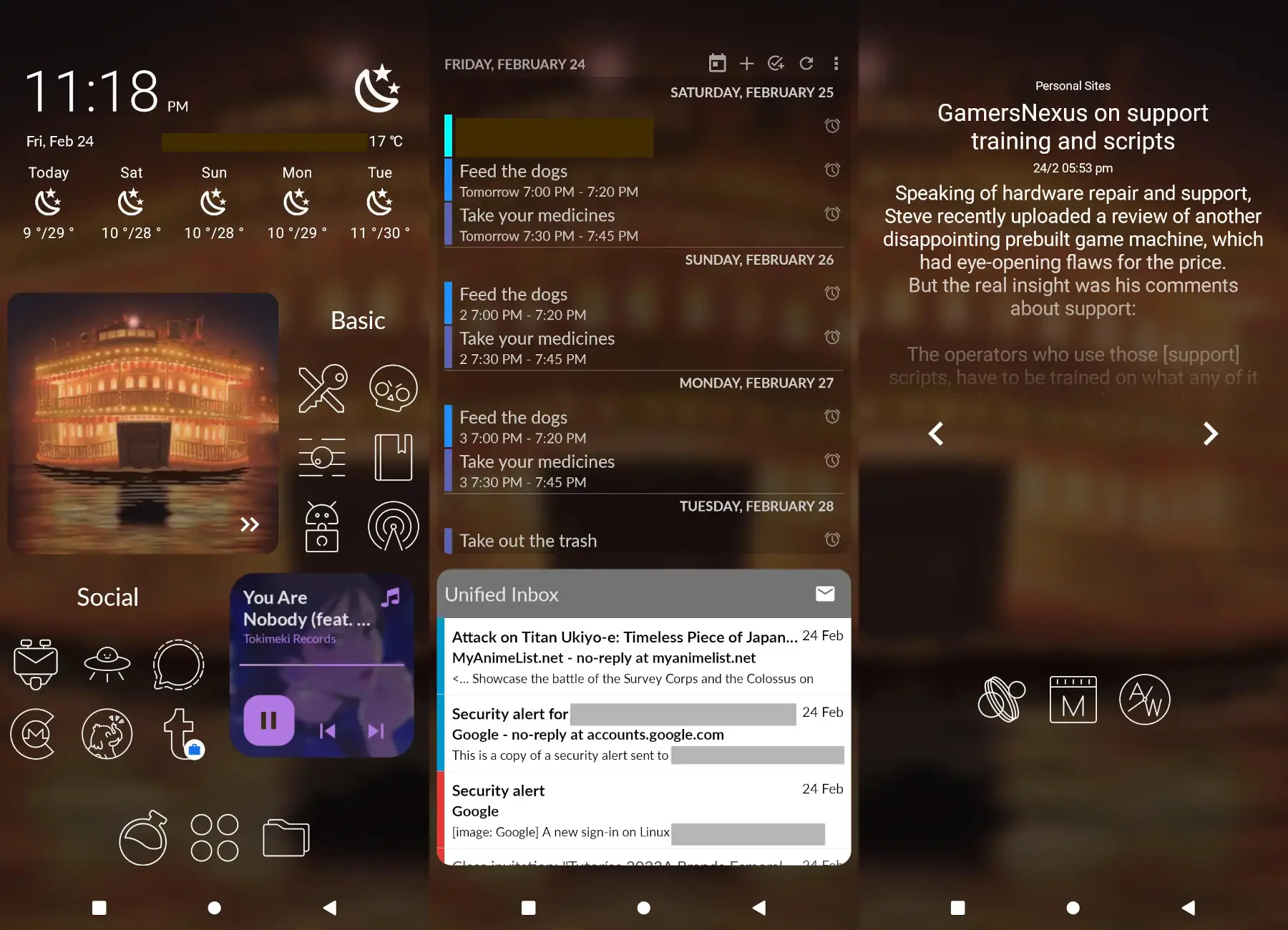
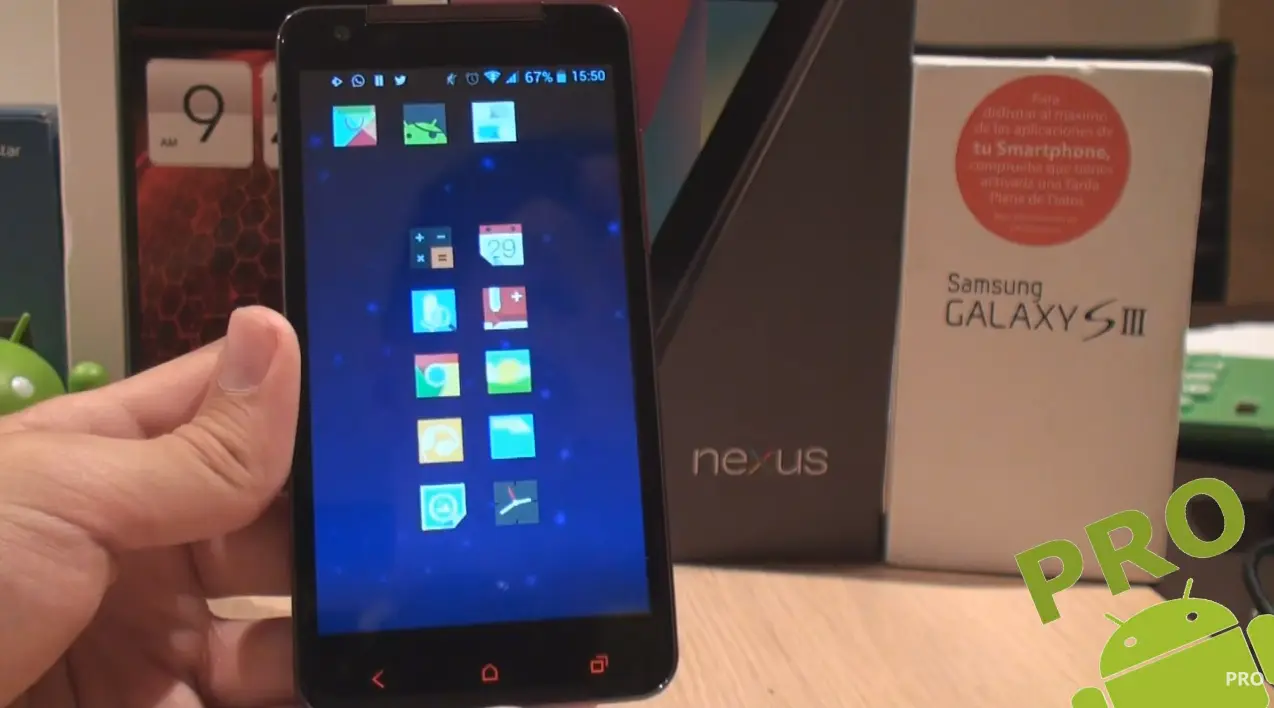
Now that we are at it, allow me to showcase my homescreen, since its kinda nice right now, pretty inspired by old videos from Pro Android’s YouTube channel:
Some screenshots of my homescreen setup. A few widgets are showcased, including the RSS reader I did with KWGT
]]>joelchronojoel.chrono@disroot.orgAndroid Apps of the Future Past2023-02-16T23:17:00-06:002023-02-16T23:17:00-06:00https://joelchrono.xyz/blog/android-apps-of-the-future-pastBack in the day Android was a lot of fun. There were a lot of apps, super unique and quite powerful, usually shared on the XDA forums and the like. There was XPosed in all of its glory, there were a lot of rooting methods for different devices, and finally a few years later, there was Magisk. It was a bit of a wild west, and sadly, I only got to live the last couple of years of this golde age of great apps and modules that were awesome and fun.
The list
These are only a few of the tons of apps I used to try back then, most of this list was inspired by watching a lot of videos by the Spanish YouTube channel Pro Android that showcased some of the best app recommendations I’ve ever seen, even compared to similar channels today. I still go back to his old catalog and find a few great apps still working from time to time.
Quick Tip:
YouTube removed sorting by oldest months ago in the web UI, you can however, use the search feature inside a Youtube channel and search for “before:20XX” as well as whatever term you want, and it will show videos from before that year. It is how it is, at least it works!
A screen grab from one of the many videos I used to watch circa 2014. By Pro Android
QuickPic
Before Simple Gallery, QuickPic was the top of the game, the simplest, lightest, fastest gallery app there was. To this day it remains one of the saddest downfalls when it comes to how good it used to be, before being acquired by Cheetah Mobile.
As soon as the acquisition took place, some mods made out of the last non-CM version have been released and the original APK still floats around in the Web. It still kind of rocks, its animations look great, and it is lighter than Simple Gallery, so maybe it’s still worth a shot for some, I decided to try the mod for a while.
SwipeBack
This is the precursor to today’s navigation gestures, this was the ultimate way to go back in an app, even more functional than today. Back in the day there were a couple other apps like this. I also remember Navigation Layer, which I never got to use. SwipeBack would display an awesome animation that showed what was “behind” the current screen. It ended up dying for a while during the 4.0 days, but got resurrected with support up to Lollipop. It has been dead for a while, and it took until Android 13 for stuff like Predictive Bar Gestures to show up, even if they are still work in progress. I absolutely loved using this Magisk Module.
Gravity Box
I was so happy when I finally got to try this module back in the day. The amount of tweaks this Xposed module provided was unmatched, probably the second-best one was XuiMod, which provided many awesome scrolling animations when opening apps, pop-ups or scrolling through lists. These things were super fancy and cool. Later one some Custom ROMs would begin adding these tweaks to the built-in settings, and eventually it stopped receiving support, at least for now, since the last Android version that it worked with was 11.
Dolphin Browser
Back then pretty much all browsers sucked, except for this one. Later on, CM Browser was also pretty good (until Cheetah Mobile showed its true colors, of course). This app was light, fast and pretty customizable for its time. Reviews of it convinced me to try it out back then, and honestly, I wish browsers today were as good. Today we have DuckDuckGo, SmartCookieWeb or Via Browser, and while the quickness is there, they are just not as fun. There were gestures shortcuts, tabs and all sorts of cool little things that still didn’t slow down the device at all. I don’t understand how apps today are so heavy when stuff like this existed back then, but maybe it used the built-in WebView engine like many light browsers today. The app is still around, but it’s nowhere near as good as before. If I were to guess, its probably a security and privacy nightmare.
Finishing thoughts
The list goes on. I guess this could be a bit of a semiregular series, there are still quite a bunch of apps from back then that aren’t needed or no longer work nowadays.
I have to admit, I feel like there are a lot missing, seriously I almost don’t want to post this one as is. But I already spent a while writing here,so it will have to do.
Anyway, I just wanted to share what used to be some of my favorite tools I used back in the day, such fun times. What are the apps you used that were awesome but ended up dying or retired from the Play Store? Please share your own list!
]]>joelchronojoel.chrono@disroot.orgPhone longevity, mistakes were made2023-02-15T21:52:57-06:002023-02-15T21:52:57-06:00https://joelchrono.xyz/blog/phone-longevity-mistakes-were-madeAfter returning from a family trip a few days ago, I was incredibly lazy and left my phone charger in the vehicle, for 3 days straight. I don’t know what I was even thinking, sometimes things like that can happen to my brain. I was charging my phone out of my laptop’s usb port, and everything seemed alright.
Aesthetic photo of a phone being charged. By Kamil Feczko on Unsplash
Anyway, it was nowhere near as nice as using a proper charger, since the laptop’s output was incredibly slow. Thankfully I didn’t use it much, and if I did, it was still plugged, so I didn’t really care. The first night was alright, I left my phone connected through my sleep and nothing of interested happened when I woke up that day.
However, the morning after that one, I woke up to a phone that was incredibly hot. I felt it through my pillow, while it was still rather early. I immediately unplugged it and in my panic I decided to leave it in the freezer for a few minutes. I tooted about the event, and from there I’ve been a lot more worried about my phone’s longevity.
You may be wondering, why would my phone heat so much, since the previous day was fine? I had no idea. But I did something different. At first, I left my laptop on, and it went to sleep and turned off the display all by itself while still logged in. The next day, however, I logged off and closed the lid. Maybe some process or daemon that manages the USB port got interrupted or something, but it is what it is, and I can only wonder the exact reason behind the overheating. The worst thing is that the phone didn’t even charge to 100%, but I guess that was actually a good thing, maybe I would have ended up with an inflated battery, or worse.
After the incident, I installed a couple of apps, such as Battery Guru and GSam Battery Monitor. It had honestly been a while since I was so worried about battery life. My Redmi Note 8 has always been reliable, and I always have just enough battery, as long as I don’t play games for too long. So, with a bit of self-control it has never been that bad.
Now I started to feel like my battery lasts less time than before. I don’t trust myself of course, since I feel like it’s just a placebo and my battery is as good as it can be after 2 years of usage. Perhaps just a single day being super hot won’t actually affect the battery that much.
Honestly, I’ve been using my phone for 2 years already, living a life of Custom ROM hopping since its bootloader got unlocked, and it still rocks Android 13 like a champ. I can live charging it a bit more often anyway.
For now, I installed Battery Charge Limit to get it to never charge beyond 80% (it requires root access), to learn to live with a bit less, for a longer period of time. But who knows, its possible that I’ll get to get a new phone this year and pass this one down to my younger siblings. If you want to help with that you can always send me a tip or something ;)
]]>joelchronojoel.chrono@disroot.orgTesting new Mastodon clients2023-01-26T17:42:56-06:002023-01-26T17:42:56-06:00https://joelchrono.xyz/blog/meowstodon--a-mastodon-clientOne of my favorite things about Android 13 and its predecesor is the Material You theming engine. Some of my favorite apps such as Infinity for Reddit and Tachiyomi reader make use of it. For some reason Tusky is still not up to date in that regard, and so my search for a new client for Mastodon that used Material You began.
Most of the crazy going on over on Mastodon as of now is the talk about Ivory and IceCubes, which are a couple of Mastodon clients for Apple devices that are quite awesome and good. I wanted to see if there were some shiny new stuff for Android too.
There are apps like Megalodon and Moshidon, which are forks of the official Mastodon app, they are not bad at all though. But I wanted to find some other clients that were built from the ground up, just to see if there was anything new.
To my knowledge, there are only two clients that have support for Material You and are also not based on the official app. Kaiteki, which is quite a promising new client that even has support for Misskey; and Meowstodon, an even newer client that only supports Mastodon as of now.
Honestly, both are still quite bare, but I’ve always loved being a beta and alpha tester for apps on Android. Right now Kaiteki feels a bit more mature but also too convoluted, it has a hamburger menu, and a ton of buttons at the top AND the bottom. This probably makes sense since its also works a desktop app, but I prefer my navigation to be reachable with my thumb, or with a gesture, which are usually broken due to Android’s navigation gesture being incompatible with sidebars after such a long time, hence my use of navigation buttons in 2023, they still rule!
Regardless, Meowstodon doesn’t have that problem, even if it still chooses to put my profile button at the top, I’ll give it a pass for now.
I have to say the spacing between posts is kind of crazy in both apps. I used to care a lot about the amount of text in my screen. Over time this was less of an issue, but still, as the image above shows, I can barely read 3 posts at a glance anywhere but on Tusky. I know Material You has some spacing guidelines and all, but a compact layout like the one Infinity for Reddit has would be quite ideal, especially being able to turn media into smaller thumbnails.
Kaiteki actually has quite a few layouts available, but its clear they are mostly intended for desktop usage, they are not ideal on mobile use as of now and their behavior is kinda wonky.
I can’t really judge much at this moment though, since there is quite a bit of active develpment going on and I expect these apps to change a lot in the following months. Meowstodon doesn’t even have a way to view profiles just yet. I can’t wait for whats coming up.
]]>joelchronojoel.chrono@disroot.orgPower user of the simple features2023-01-25T23:39:44-06:002023-01-25T23:39:44-06:00https://joelchrono.xyz/blog/power-user-of-the-simple-featuresI just can’t let things stay default, I don’t know why. I want to know every single setting, keybinding and customization I can do with any program I use. I tend to spend quite a bit of time watching videos about tips and tricks about everything.
Some examples are these:
On my screen keyboard. turning off keypress pop-ups, swiping the backspace button to delete words or the space bar to drag the cursor around.
On Tusky, the Mastodon client, disabling the top bar and moving the navigation buttons to the bottom. Also enabling its amoled dark mode, adding custom tabs, etc.
Saving comics as .cbz in Tachiyomi, setting up local manga sources for offline reading and enabling automatic backups.
Enabling custom colors in DAVx5 for my synced calendars, changing the audio stream for reminders in Simple Calendar so I can turnoff normal notifications and not miss events.
Grouping direct sub-folders in Simple Gallery and enabling rounded corners for the thumbnail style.
Disabling all automatic downloads for media in apps like Signal or WhatsApp to save space.
Creating subscription groups on Newpipe and custom tabs for specific channels.
Using tags on AntennaPod, setting up auto-download for new episodes of specific podcasts, auto-deletion, skipping intros, etc.
Installing a Magisk module to allow storage access to restricted folders so I can sync them with Syncthing.
Using Newsboat as a client for my FreshRSS instance
Setting up Neomutt for email and integrating with CardDAV using khal and vdirsyncer
Enabling themes and custom css on Firefox to setup a onliner interface.
And these are some features on many different apps that I just enjoy having around and I can’t help but keep tweaking all the time
]]>joelchronojoel.chrono@disroot.orgDegoogled, again, on Android 132023-01-19T21:47:04-06:002023-01-19T21:47:04-06:00https://joelchrono.xyz/blog/degoogled--againI think I mentioned this in Mastodon at some point, but for a while I’d been using Google services on my device because I wanted to use some paid apps I had and also see how well did notifications behaved, since apps like WhatsApp and Discord do not work as well because their push notifications rely on Google.
I change roms pretty much every semester, I think I’ve done a lot of posts regarding Android and my tendency to customize it and try out their latest versions using all kinds of roms from MSM Extended, to ArrowOS or CR Droid. I have never even installed LineageOS on this device, simply because I prefer customizability over privacy/security.
At this point, I know what I’m looking for, and what I’m doing. I’ll settle for LineageOS once my device is approaching EOL on most of its official roms. Even so, I’ve lived through tons of unofficial roms in previous phones without a ton of trouble. Most of the time devs simply want to keep alive their device, and I choose to trust them.
Anyways, enough justifying myself for no reason. I installed the rom, I restored my apps, I installed some extra stuff and I was pretty happy. I was still a bit annoyed that notifications would not work in certain apps. I’ve known of MicroG for a long time, I even tried them a couple roms ago by installing them on F-Droid as suggested in the mastodon post I linked. It kind of worked. But the functionality was not as great as I thought.
This time, however, I decided to try again, after I found a Magisk Module to install MicroG, and decided to give it a go. I was pleasantly surprised, because it worked wonderfully, and after enabling its Cloud Messaging for push notifications, the apps started to work just fine, unlike last time. It is quite sad that not that many apps rely on open standards such as UnifiedPush just yet.
Regardless, now that notifications work perfectly fine on my proprietary apps, which are also containerized in a Work Profile using Shelter (F-Droid | Play Store). I feel really comfortable with my device.
I also found Iconify an app that lets me customize my phone’s quick settings, volume and notifications panel with absolute ease, its super beautiful!
The only problem right now is a bug in my rom that sometimes freezes it to a black screen after waking up the device. It usually happens while playing audio, but I still don’t find a solution and its bothering me just enough that I am considering switching to ArrowOS or something, which also has an Android 13 rom now.
Anyways, those were some thoughts about the latest update on my device’s rom. Thanks for reading!
]]>joelchronojoel.chrono@disroot.orgBacking up my smartphone data2023-01-15T23:00:00-06:002023-01-15T23:00:00-06:00https://joelchrono.xyz/blog/to-do-list-for-rom-backupSo right now CRDroid 9.1, which is based on Android 13, is being flashed on my device. I made every backup imaginable and realized I almost missed my streak. I’ve been blogging for 2 weeks straight!
After that paragraph, the zip got installed and its playing the boot animation as of right now. I hope it works alright, I have been waiting for a more mature release of my rom to be available. I have not installed Magisk yet, I just did a clean flash and booted from there.
It booted! Its all fine, I will flash Magisk in a moment, I will share a quick list of the things I cared about backing up.
Backup strategy
I did not worry much about my Contacts, Calendar, Syncthing, Pictures and RSS feeds, since I have it all synced via DAV or in an external micro SD card.
I backed up stuff such as my AntennaPod database, WhatsApp chats (a must in México), Signal chats, my ActivityWatch buckets and PGP keys (with OpenKeychain).
]]>joelchronojoel.chrono@disroot.orgThe Fediverse and school stuff2022-11-14T14:49:44-06:002022-11-14T14:49:44-06:00https://joelchrono.xyz/blog/fediverse-and-schoolI have a lot of things to say but not much to say about a single one, pretty much the same thing as Scott Banwart’s weekly journal posts. Of course its been more than a week since my last post here, regardless.
The Fediverse is growing, but it has a long way to go
Fosstodon now has more than 40K users, that alone is insane, since I remember being impressed back in April at the amount of growth seen during that first wave of Twitter users migrated.
I think its important to bring up that the amount of users is still insignificant, Twitter is already the smallest of the big social network, even though it feels like a lot is shared and talked about on it, the reality is different.
My country, Mexico, is still big on Facebook and Instagram (lately, TikTok too) by an order of magnitude, that’s just how it is.
If you recently joined Mastodon or any node of the Fediverse, please do it for the right reason. I don’t like politics, I joined Fosstodon because I like software, coding, technology and the like, and I wanted to meet some like-minded people in that regard. I am not there to read about politics of foreign countries. Thankfully Mastodon is pretty useful at filtering stuff out, and I myself don’t care if I end up reading it, since I just forget about it.
I have hopes that Fosstodon will stay afloat and won’t lose its focus, some people are worried that the Twitter culture may stain the status quo of the overall community, but I think this is just momentary. And contrary to popular belief, trends and behaviour is not the same everywhere in the Fediverse, its tons of different communities interacting with each other, but there is still some independence, which makes this place more resilient than some may assume.
Besides, even though its userbase is not as big, I honestly prefer it that way.
Some Science Fair shenanigans
For my Fuzzy Control class, the teacher challenged us to design a Fuzzy controller for our science fair project. I have to say, I am quite a fan of how fuzzy logic works. Being able to understand the magic behind it all was quite interesting.
We decided to use Matlab to design our system using the Fuzzy Logic Toolbox, and we also found a program online that would allow us to export that directly to code for Arduino.
We built a Temperature and Humidity controller system, be it for a room or maybe an incubator. I actually spent more time building the hardware to house our circuits and sensors when compared to the code itself.
I feel like we kinda cheated the system, but the teacher allowed us to use Matlab in the first place rather than coding from scratch, so we only expanded our toolset a bit and did it all in like, a couple hours.
When the event started we had to sit around in a place assigned to us for around 10 hours, explaining our project to whoever passed by, it was quite entertaining for me, but I couldn’t help but notice how everyone around it was tired already, I guess I like talking about stuff I like with strangers a little too much.
In the end the winners were some girls that attracted everyone’s attention, they combined extracts and chemicals to make colored markers to draw and stuff. Our place was right beside them and everyone went and drew stuff in pieces of paper that got given away by the end of the event. Some of those drawings were actually awesome, not gonna lie.
Google is on my Android again
I unexpectedly started to use Discord more often, I joined a couple of interesting servers and I wanted to talk there a little more. However, notifications don’t work on a degoogled phone and I decided to try installing the Google Apps again on my device. I got told that it would work fine despite already having a ROM and apps installed. It was a lie.
I got stuck in a bootloop, thankfully a simple Factory Reset kept my internal storage intact (thanks to latest versions of TWRP being able to decrypt storage on Android 12) although I lost my app data.
Recovering from data loss
Thanks to the power of being kinda careful, the biggest loss of mine was a dozen of Newpipe subscriptions and my list of read books and bookmarks (which I had already forgotten until I recalled them while writing this blogpost)
My manga progress is kept on Anilist, and I had backups enabled anyway on the Tachiyomi reader, so I didn’t have to build my library from scratch, I just imported it and logged in to my trackers.
WhatsApp Backups were enabled and since internal storage didn’t get wiped, reinstalling the app recognized the backup immediately, which was a couple hours old.
Signal Backups were enabled and no data was lost.
Passwords and 2FA were perfectly safe on a folder synced with Syncthing, but again, no data was lost anyway.
Pretty much all other apps required me to log in and stuff. I had a backup of my email accounts of K9 Mail, so readding them was not hard at all.
The saddest and biggest failure, is that I lost all my Wi-Fi passwords. Can someone tell me why is there no way to back them up already?
Google being annoying
I decided to log in to my Google Account since I wanted to access some paid apps that I quite like. Sadly this also synced my contacts, which I had on my Nextcloud DAV already, and were annoyingly duplicating my list. Thankfully, @konstantin helped out and I quickly removed the dulplicates from my phone.
I am now waiting for Android 13 roms to become more stable, so I can degoogle my life again. Or maybe not, notifications are quite nice to be honest.
]]>joelchronojoel.chrono@disroot.orgLocal music is what I need2022-08-26T09:25:58-05:002022-08-26T09:25:58-05:00https://joelchrono.xyz/blog/local-music-is-what-i-needSo there was a post I read on my RSS feed, by fellow fosstodon user, Nathan Dyer, about what you actually need to build a local music collection. I found it quite a nice read, and it made me think about my current setup, using Navidrome (previously Jellyfin, but since I moved to Yunohost I haven’t installed it again) to stream music to my device.
Then I realized something that was quite revealing.
I don’t have a mobile data plan, and the wifi at school and most public places, sucks.
Well, why don’t you just download the stuff you want from your server?
That’s a very valid question dear reader, but does it make sense for me to do it? My music collection is not that big, yeah I do have some flac files and others are just mp3, but the truth is I don’t even reach 10GB in total.
Besides, navidrome music clients, while quite good, are still not as feature rich, and navidrome itself limits the customization a lot, I would have to upload music to my server already fully tagged and such, since write access is not allowed, its a good security measure, but annoying when I realize I made a mistake when tagging my music and details like that.
Jellyfin is not much different, basic things like playlist creation tend to fail even with clients such as Finamp. The functionality is better when online, but since I would normally just download albums and create/edit playlists on the move (offline), its not really a good experience.
So what are you gonna do then?
Well, first of all, back it all up properly. I already did a big mess one time where I lost like a fourth of my collection because of symlink shenanigans.
I decided to go with Syncthing, because its the best thing ever, and I will have 3 separate copies of my library. This means more storage is in use, but I don’t really have a problem with that, after all, if you don’t have 3 copies of something, it doesn’t exist, right?
Besides, this means any changes I do to the files from one device will reflect properly in the other 2, so I can use something like Kid3 or Picard on my desktop and make my phone pickup the metadata pretty much inmediately.
I can also make a decent folder structure, since I hate having a single Music folder with all the music all over the place, please don’t do that, but if you do, unsubscribe from my RSS immediately.
Programs I use for playing, editing and scrobbling
A neat feature that both Jellyfin and Navidrome had, and that I use during some of my Monthly Summaries is music scrobbling, which means keeping track of listened tracks. I was wondering if it was possible to do the same thing, and I realized that its actually really easy!
Installing Simple Scrobbler from F-Droid did the trick, I use Listenbrainz to track my music consumption, it works quite well.
For listening to my music, I use Retro Music Player, its pretty much the best looking player on F-Droid, and it also supports editing opus files. Phonograph Pro is another great option, but I could not edit opus files there, the interface is starting to look outdated to me too.
On my desktop, I am using Elisa, which is the default music player in KDE Plasma, which I am using on Fedora. It does not seem to recognize opus files as music files though, so I am looking for other options. I don’t really play music from my computer though.
Editing metadata is done, as I mentioned, with Kid3, but there are tons of other programs too, or just use the music player itself, as I do on Android.
What about you?
I am pretty happy with my setup right now, it works, it backs my data on multiple places and keepts it synced, and the experience of playing music has improved a lot.
Once again, Syncthing comes to the rescue, one of the things I have doubts about is how much does it affect the performance and lifespan of hard disks. I hope not that much, its not like I’ll add music every day, I should probably pause the folder from time to time and just have my phone and laptop exchange data, since I download music from my computer most of the time anyways.
One last question remains: how do I get music? Well, I don’t know what to tell you, I usually seek into my soul to find the music I need. I’ve gotten music on Bandcamp too, ripping it from CDs a couple times, or using something like SpotDL may be up your alley if you don’t care about the quality as much.
]]>joelchronojoel.chrono@disroot.orgSettling on a Custom Rom2022-07-06T18:39:28-05:002022-07-06T18:39:28-05:00https://joelchrono.xyz/blog/settling-on-a-custom-romSo I really like customizing my Android phone, and I have switched my rom a bunch of times since before I started this blog.
But I believe this is the first time that I’ve restrained myself to the same ROM for multiple updates, without any factory reset or wipe of my data. Even mantaining encryption enabled for better security, although I still have superuser enabled via Magisk, but its my phone so deal with it.
This update they fixed plenty of bugs, the most annoying of which was one where the SystemUI stopped working if I accessed an app’s info screen from the recents overview. I also noticed a smoother experience and animations, which are always a little sloppy on 3rd party launchers. Yes, I am still rocking Nova Launcher, its just too good, even if its not FOSS. Don’t bother recommending anything, I’ve tried it all and just keep coming back, sorry.
So yeah, I think I am staying on CR Droid for the time being, the support is great and everything works just fine. So I guess my ROM-hopping has ended when it comes to Android 12 roms. Let’s wait for what 13 has to offer…
]]>joelchronojoel.chrono@disroot.orgFOSS Android apps I like2022-07-05T15:59:50-05:002022-07-05T15:59:50-05:00https://joelchrono.xyz/blog/foss-android-apps-i-likeAs an added bonus, all the apps in this list have an icon available on the Arcticons icon pack, most probably made by me B). Other than that, the description pretty much says it all so I’ll just start with the list.
PolyCal is a calendar widget that does exactly what I want, its just a compact list of events, with the important information laid out in a really minimal way. It does not have a lot of settings, but you can adjust the date format and some other things.
It integrates well with Simple Calendar and most others, since it requires Calendar access and all that. You can even select only certain calendars to show up, which adds a nice bit of privacy.
Just look at that title! if that wasn’t enough to try it out, I don’t know what will. This is a great collection of retro games that can be played solo and even online with your friends. It’s also made with Godot, an open source game engine that I’ve used in the past. it has a great aesthetic and the controls are great, so if you find yourself bored you should give it a go.
This is quite a recent discovery for me. The app just does what it says, you can add a URL from some web radio and play it no problem, what I like about it is that you don’t even have to know the URL of anything, it comes with quite a big list of stations you can just add and forget. I personally found some nice Lo-fi and Videogame music stations that I didn’t even know I needed in my life.
There are no subscriptions and no need to get a local music collection, just choose a station that fits your mood and be free.
This is a really nice Gemini client (remember when that was all the rage?). It works great for the few sites I follow with it. I really enjoy using it, even if its not so common when it happens. I started a Gemini capsule along this website back then, but it has been a second class citizen and it barely functions properly, but you can visit it if you feel like it
If you are a reader like me you are probably aware of Goodreads, a website that lets you keep track of books you read. If you are a Fediverse advocate like me, you probably know about Bookwyrm, the alternative to it.
Openreads is, sadly, not a Bookwyrm client, but it allows you to keep track of the books you’ve read locally on your device. It also has a great UI and smoothness. It would be great if it could sync with Bookwyrm, skipping on the social aspect, like how Tachiyomi syncs progress with MAL or Anilist.
That’s it
So yeah I just wanted to share some apps that I thought deserved a bit more recognition, they are not in any particular order but this is the end of the post so it doesn’t really matter what I say now.
Anyways, let me know if you would like me to do this again with some other apps or maybe some Linux programs too. Until later.
]]>joelchronojoel.chrono@disroot.orgThe smartphones I’ve owned so far2022-06-04T09:36:00-05:002022-06-04T09:36:00-05:00https://joelchrono.xyz/blog/the-smartphones-ive-owned-so-farNote: Updated in May 9, 2024 to reflect my latest smartphone after Robb Knight published his own article of this type
My first post when I started this blog was about Android launchers and customization, and I talked a little bit about my history with smartphones and how much I liked to customize them and make them mine.
So I thought it was about time I went ahead and wrote about the history of devices I’ve owned and played around with, I thought it would be fun to make a trip down memory lane…
The dark times
First, what did I have before Android was even a thing? Well, I was just a kid back then, so I don’t remember specific models, but I at least know the type of phone and brands I had.
My first cellphone could not do phone calls, it was a Nokia phone that was locked down so it would only work in the US (I didn’t live in the US). It had a green monochrome screen that served me well to play simple games such as Snake and Space Impact. It was a wonderful little thing with tons of battery and fun, it resembled a classic Nokia 3310, but the up and down keys were in the middle (Kinda like the 3510, but I remember the keys being separated). I have not found a picture of it anywhere.
After that, my second device would be a Sony Ericcson, after some googling I was able to find that it was a K300i. I remember playing a Darts game on it, as well as recording a lot of videos of me practicing magic tricks, the quality was not great, but kinda decent back then. Again, I didn’t really had a SIM card, so no phone calls.
Sony Ericcson K300i
There was another phone that I really liked, because it finally had a QWERTY keyboard, it was an LG phone with a Windows Mobile OS, it was really fun. This was one of the first times I tried side-loading stuff, I realized the phone could run java apps, so I found a version of Plants vs Zombies and managed to get it running on it. It didn’t run great, but it was cool nonetheless.
Looks like LG made a ton of phones with QWERTY keyboards, so I couldn’t quite find the model I used to have. I remember its keys were all separated, instead of being like a single grid, they were all a bit spaced out, and it was quite squared, the body was not as rounded as some of the models I saw online.
The rise of Android
When Android came out, I remember the talks about it, one of my most clear memories were a friend who thaught Android apps where pirated versions of iOS, and that’s why they were free on Android’s Marketplace and paid in the App Store.
I really defended Android back then, I remember phones like the Samsung Galaxy Ace taking over the budget market, and stuff like the Galaxy S phones growing in popularity. I also remember the Galaxy Young ripping everyone off with its terrible performance compared to its older brothers.
2012
Back then my dad didn’t really like smartphones, and didn’t feel the need for one, and my mom had a similar sentiment. But one day we ended up at a gas station where they had an electronics store, my dad was buying a FM radio transmitter for the car. I saw some phones there, and I somehow convinced him on the spot to get a phone for mom. It was some terrible chinese knock-off that was super cheap. It ran android 2.3.5 and it kinda sucked, it was already out of date when we got it, I remember around that time learning about Nova Launcher and icons packs, and it all required Android 2.3.6 or 4.0.
It didn’t take long for my mom to give up on the touch keyboard and get another phone. The thing actually had quite a lot of buttons compared to today’s navigation gestures; along the volume and power buttons, there also was a Search, Menu, Home, Back and Overview buttons, which is kinda interesting.
I ended up getting it, and I was very happy, at least it had some things that modern phones lack, like a removable battery, a TV antenna that also worked for FM radio (without needing plugged in headphones) and an SD card slot.
I got Whatsapp, games like Flow Free, Pou, or Zombie Highway, and it was quite great. Sadly, I didn’t have a lot of storage, just updating from the Android Market to the Play Store left me with enough space for a couple other apps. So I was quite limited.
Eventually the battery inflated and I did not bother to look for a replacement it, I wasn’t even aware of stuff like that just yet.
I actually still have the box of this device, but it had another thinner box around it that contained all the information, so the actual container does not say anything.
2013
HTC Status
The next phone I got was once again passed down by my mother. She got an HTC Status, also known as the HTC ChaCha, and it had a QWERTY keyboard and Android 2.3.6, still.
I really liked its interface, it looked really nice, with great animations and a skeumorphic look that rivaled Apple’s. Sadly, the horizontal screen limited the apps that worked on it, they just didn’t look right. It had a direct Facebook button, which I found quite annoying since I didn’t have an account (although I wanted one, back then). The storage was, once again, quite limited so I never really had a chance to explore too much with it. I did try a couple of launchers and icon packs tho, like Smart Launcher 3 and an icon pack called Goolors, which is not available anymore. Most other launchers were vertical only though.
2015
Samsung Galaxy S III mini
It was not until the Samsung Galaxy S III mini, passed down to me by my father around 2015, that I finally got the chance to play around with root access and custom roms. I remember that I bricked it the first day I got it, I was so eager to mess with it, and I flashed the wrong recovery. Thankfully, Odin was a thing and flashing the stock rom was not hard at all. I decided to wait for a while (only a couple days, actually 😅) to try again. I eventually found out about the rom mantainer’s website of the different roms available for my device, so I stopped relying on specific YouTube tutorials.
I was very happy during this time, I tried a ton of roms, many mods of the stock samsung UI (Touchwiz), stuff like Carbon or Resurrection Remix, with versions like Android KitKat, Lollipop, up to Marshmellow and even Nougat. It was a great time.
Sadly, out of nowhere, my phone died completely, it just stopped turning on. I actually had two Galaxy S III minis, but the second one was locked down, so, again, no phone calls, it worked for a while though, until I managed to fully submerge it in water, and it ended up dying months later, the charging port was also quite messed up, so it wasn’t even charging properly already.
I ended up going back to the HTC Status for a while, with only Whatsapp, Facebook Lite and Geometry Dash installed on it, anything else would not fit, at the time I realized there was a 4.0 custom rom somewhere, but I never bothered trying it out.
2018
Xiaomi Redmi 5A
It took until now to finally get a new phone, that was actually new. I had saved some money, and my dad would pay half of it, I wanted a Xiaomi Redmi 5A, codename: Riva; it was a really good phone for the price, pretty low end, but good enough for me, since I knew it had good rom support, even today I think it has some Android 12 roms available.
I remember I spent a couple months running MIUI on it, I kinda liked it to be honest, it worked just fine. However the limitations it had on background processes, and the bad support for auto-fill were a bummer. It was around this time that I started to get interested in using FOSS, and since Bitwarden, my password manager at the time, did not work properly, I decided to try out some custom roms.
Once again, I got the wrong recovery for it, I was getting some blurry lines instead of the proper interface, turns out that the recovery to install Android Pie roms or Android 10 was different, but thankfully it was a matter of running an ADB command and flashing the right thing. It did scare me though, so I waited a couple weeks until I tried again, this time I succeded and got into the world of custom roms once again.
This was the first device where I could try pretty much everything without worrying about compatibility. I only had 16 GB of storage, but I learned to live with that just fine.
Sadly, once again the charging port was starting to show its age and quality, becoming looser and faulty. If there was anything that made me want to switch phones, it would be the lack of a fingerprint scanner, and that it still used microUSB for charging, other than that it was pretty awesome, I could probably still use it today, since I kinda like the small form factor too, which is even less common today.
2020
Xiaomi Redmi Note 8
And finally, we arrive at my current phone, the Xiaomi Redmi Note 8, codename: ginkgo. Yet again I saved up half of the price and my dad completed it. I remember being so excited about it, since it would be the biggest step up since the S III mini. I would be having a current gen phone for the first time, even if it would be a mid-range phone, its more than enough.
I have to admit there were not a lot of new things that weren’t possible with my S III mini or my Redmi 5A, but just type C charging and updated hardware is more than enough for me, not to mention the great support for custom firmware.
Its the phone where I’ve managed to go degoogled for the longest time (if you don’t count the ocasional browser logins for Google Classroom and other school shenanigans).
I am still really happy with my current device, and I don’t see myself switching at least for another year. For the future I am looking forward to getting a Google Pixel 6A or 7A, whatever is latest when I have to change. Or I might go with another chinese phone if they still have Snapdragon chips, since they have not been in the Redmi Note series for a while, as far as I’ve seen.
2023
Poco F4
This is my current device! the first one I bought with my own money, which is pretty cool. I wrote some of my first impressions on it in this post.
I still love it!
Conclusions
There were other less important dumb phones I used too, but I didn’t see the point on mentioning them since I don’t remember their model or anything interesting I did on them.
It has been fun to write all this, I was remembering stuff on the spot and many fun memories returned to me. It was quite a wordy post this time around, vacations seem to be going quite well.
I hope more people try doing this, I got the idea from a post by Ru, so maybe you’ll be inspired too.
]]>joelchronojoel.chrono@disroot.orgFreshRSS Android Apps2022-05-05T09:58:51-05:002022-05-05T09:58:51-05:00https://joelchrono.xyz/blog/freshrss-android-appsThis post won’t be long, I just wanted to keep going a bit about the state of RSS reader apps on Android. Ever since Flym died, I have been looking for an alternative, and since I moved to FreshRSS, my needs got a bit more specific, since I need a client with support for Fever’s or Google Reader’s API. So far, nothing has managed to convinced me.
Locally there are many options. Feeder is probably the best we got among the FOSS apps available on F-Droid. It has been going through a UI revamp and its looking pretty good, but it has no way to sync to any APIs, only locally. The developer seems willing to accept a PR that adds this, but so far, no luck. The issue related to this has been open for 4 years.
Apps that can sync with FreshRSS are few and far between. A quick search on F-Droid for “FreshRSS” only shows 3 results, all of them are pretty outdated. There is plain FreshRSS, which looks pretty ugly and is sluggish on my device. There is EasyRSS which looks straight out of Android KitKat. But I have to admit, it’s buttery smooth, and super lightweight too.
Right now, Readrops is the most modern looking of the bunch, and my current choice at the moment, however, it still feels a bit old. And the compatibility is bare, favorites work, but labels don’t, for example. Also, the dark theme is not of my liking.
There is actually another app with a very elegant design, that shows up when looking for “Fresh RSS” on F-Droid: Fluent Reader.
However, such design is following Apple’s guidelines, instead of Material design, which makes it not fit at all with the rest of my system. That’s pretty much my only complain.
Sadly, the current best Android client for FreshRSS is FeedMe, it is not FOSS, but it has support for a lot of APIs and pretty much all of the features FreshRSS comes with, its design is great and functional. The only thing I don’t like is the settings page having a sidebar, but that’s about it.
I am a bit conflicted between a great but proprietary product, or a decent FOSS option that mostly works for my needs. My FOSS enthusiast side ended up winning, so I have been stuck between the mobile Web UI and Readrops for a while now.
However, the future is a bright one, I recently stumbled upon a new kid on the block that came out on F-Droid recently. ReadYou has a modern and beautiful UI (unless you don’t like Material You), as well as an awesome list of upcoming features, including support for the APIs supported by FreshRSS, which is exactly what I am looking for.
ReadYou is still implementing some basic features, so FreshRSS and sync support is still not being implemented, but the fact that its planned at all has given me hope. I decided to wait on it for now. However, it works locally just fine, so if you want to give it a go, I encourage you to try it out!
]]>joelchronojoel.chrono@disroot.orgKeeping track of things2022-02-01T22:14:35-06:002022-02-01T22:14:35-06:00https://joelchrono.xyz/blog/keeping-track-of-thingsSo I was reading the latest blogpost by Edel, a fellow Fosstodon member, about the many things she has done this month, from books, music, app usage and other things. I started following her blog recently since she joined the #100DaysToOffload which I am about to finish.
I’ve thought about how cool it is to be able to pick a week, or a date and be able to know what you did in that day. I haven’t really had the time to do journaling or anything like that, but I guess this blog has kind of become that for me, although I don’t really follow any method and go by whatever I feel like writing, which I guess is yet another way of journaling.
I didn’t even know a lot of the software and tools that Edel used to track all of that stuff. So I guess I will take a look at them sometime soon, since I don’t really have such granular control over the things I currently do.
Some programs I use have decent usage statistics though. Like AntennaPod, but it still lacks daily, monthly or yearly metrics, it only keeps track of the time I’ve spent listening to each podcast I follow.
Tachiyomi also tracks my progress reading manga, and the database it keeps is pretty nice, I use Anilist to keep track of both manga and anime in the same place. I also use Backloggd to track the videogames I’ve played, as well as Letterboxd for movies I watch.
I have decided to use ActivityWatch too, I installed my app on my phone, which is sadly not dark themed, as well as the Linux client. I might put some work into the CSS or just wait for the devs to work on it, maybe its already in some setting and I’m just missing it.
Anyways, I didn’t really have that much to say today. I like the idea of keeping track of things, I hope I get some use out of the data I’m collecting, maybe I will try to make it appear in my website somehow for anyone to see using some API or something.
Another thing that kinda made me think of this is the time I’ve invested into manga reading. The one I am reading like crazy since I finished Solo Leveling is Kingdom, the story is so good and its starting to take away my time from other things, I love the battles and action, its a lot easier to follow and feels much more realistic, despite a few fantasy elements here and there.
I just realized I spent 5 hours reading it today, 6 yesterday, despite having classes today, I got quite distracted this time, which is bad, because I don’t want to end up doing “just enough” to pass, since I know I can do a lot better. I’ll probably read some more before going to sleep, but I have to restrain myself since school is starting to get serious again.